Secure Self-Hosted WCF REST Services with a Custom UserNamePasswordValidator

Download the code for this blog post here.

When securing WCF services you’re faced with a choice: Message versus Transport security. Unless you need to conceal messages from an intermediary, your best bet is to stick with transport security and use SSL to secure messages traveling over HTTP.  Using SSL is generally the best choice for ensuring point-to-point privacy and integrity, which lets you pass user credentials over the wire when directly invoking service operations.  This means you can eschew the complexity and overhead of message-based security in favor of the simpler and leaner model of transport-based security.

Once you’ve settled on the option of transport security, there’s the issue of which authentication mode to use.  In most B2B scenarios, it makes sense to go with X509 certificates for client authentication, but that also places demands on clients to sign messages using the certificate.  Another possibility is plain old shared-secret authentication where you might look up usernames and passwords in a database in order to authenticate requests.  WCF has terrific support for this scenario and allows you to supply a custom UserNamePasswordValidator, which you can use to validate client credentials.  Here is an example of a class that extends UserNamePasswordValidator by validating passwords against a hard-coded value.  (Of course, you’ll want to employ a more sophisticated technique, such as hashing the password to compare against entries in a database table.)

public class PasswordValidator : UserNamePasswordValidator
{
    public override void Validate(string userName, string password)
    {
        if (string.Equals(userName, "Alice", StringComparison.OrdinalIgnoreCase)
            && password == "Password123!@#") return;
        throw new SecurityTokenValidationException();
    }
}

You’ll need to set the security mode of the basic HTTP binding to “TransportWithMessageCredential.” This will cause the service to look in a soap header for client credentials. Then you’ll want to add a serviceCredentials behavior that sets the validation mode to “Custom” and specifies PasswordValidator as the validator type.

<serviceBehaviors>
  <behavior>
    <serviceCredentials>
      <userNameAuthentication userNamePasswordValidationMode="Custom"
          customUserNamePasswordValidatorType="Security.PasswordValidator, Security"/>
    </serviceCredentials>
  </behavior>
</serviceBehaviors>

This is all fine and dandy, but it assumes that clients will only be talking Soap – what about REST-ful clients who don’t know a thing about Soap? It turns out the serviceCredentials behavior doesn’t really have much to do with whether it’s a Soap or Rest-based service.  To authenticate REST clients, you can set the security mode of the web http binding to “Transport” and specify a client credential type of “Basic.”

<webHttpBinding>
  <binding>
    <security mode="Transport">
      <transport clientCredentialType="Basic"/>
    </security>
  </binding>
</webHttpBinding>

Note that this technique will only work when your service is self-hosted (for example, using a Windows Service).  In this case, WCF will hand off authentication to your custom UserNamePasswordValidator type.  However, when hosting in IIS, WCF will allow IIS to handle basic authentication using Windows accounts, and you’ll need a different approach, such as setting the client credential type to None and handling the authentication yourself.

Once you’ve enabled Basic authentication in your self-hosted WCF service, it’s up to the client to set the Authorization header to “Basic” with a username:password string that is base64 encoded.

private static string GetAuthHeader(string userName, string password)
{
    string userNamePassword = Convert.ToBase64String
        (new UTF8Encoding().GetBytes(string.Format("{0}:{1}", userName, password)));
    return string.Format("Basic {0}", userNamePassword);
}

To enable SSL for self-hosted services you’ll need to perform a few extra steps.  First, open an admin command prompt and bind the certificate to the port you’ll be using.  You’ll need to inspect the certificate details (use the Certificates MMC snap-in) to copy the thumbprint, remove the spaces and set the certHash parameter to it. Any arbitrary guid will work for the appId parameter.

netsh http add sslcert ipport=0.0.0.0:2345 certhash=a66c5ed2b8ab91de21d637c6f9a13fd45a8ba92a appid={646937c0-1042-4e81-a3b6-47d678d68ba9}

You may also need to grant permission for the process hosting your service to register a url with Http.Sys.

netsh http add urlacl url=https://+:2345/ user=NetworkService

This assumes you’re running Windows Vista or later.  For earlier versions of Windows you will need to use httpcfg – see here for more info.

The nice thing about WCF is its unified programming model, which allows you to use the same username / password validator for both Soap and Rest clients.  Download and go through the code for this blog post to see it all in action.  Enjoy.

Posted in Technical | Tagged , , | 19 Comments

Decouple WCF Services from their DI Container with Common Instance Factory

instance-factory-logo2In my last blog post I introduced the Common Instance Factory, which I built as an alternative to Common Service Locator to reduce coupling between an application and a Dependency Injection (DI) container.  Unlike the Common Service Locator (CSL), the Common Instance Factory (CIF) discourages the service location anti-pattern by using the abstract factory design pattern.

I would venture to say that in many cases, introducing this additional layer of abstraction is not always necessary.  If you are careful to register your types early in the startup of your application and avoid referencing the DI container from within your types (which is where the service location ant-pattern rears its ugly head), then selecting a DI container and sticking with it might be perfectly appropriate.  And I would certainly not use CIF for unit tests (or even some integration tests), where you need to leverage features of the DI container that are not exposed via the factory interface.

There are other situations, however, when wrapping the DI container with the CIF will give you the kind of decoupling and flexibility you want in your application architecture. This layer of abstraction can be especially advantageous, for example, when building ASP.NET apps or WCF services where performance is a critical factor. In this case, you might want to use a super-fast DI container, such as SimpleInjector, for the application while leveraging a full-featured DI container, just as Ninject, for unit testing.

The NuGet package, CommonInstanceFactory.Extensions.Wcf, provides the building blocks for hosting WCF services which are decoupled from a particular DI container. The first component is the InjectedInstanceProvider, which implements the WCF interface, IInstanceProvider, using ICommonInstanceFactory to retrieve and release instances from the DI container (see my prior blog post for more information on ICommonInstanceFactory).

public class InjectedInstanceProvider<TServiceType> : IInstanceProvider
    where TServiceType : class
{
    private readonly ICommonInstanceFactory<TServiceType> _container;

    public InjectedInstanceProvider(ICommonInstanceFactory<TServiceType> container)
    {
        _container = container;
    }

    public object GetInstance(InstanceContext instanceContext, Message message)
    {
        return GetInstance(instanceContext);
    }

    public object GetInstance(InstanceContext instanceContext)
    {
        TServiceType service = _container.GetInstance();
        return service;
    }

    public void ReleaseInstance(InstanceContext instanceContext, object instance)
    {
        var service = instance as TServiceType;
        if (service != null)
        {
            try
            {
                _container.ReleaseInstance(service);
            }
            finally
            {
                var disposable = instance as IDisposable;
                if (disposable != null)
                {
                    disposable.Dispose();
                }
            }
        }
    }
}

If the underlying DI container does not implement ReleaseInstance, no harm no foul. Notice how ReleaseInstance checks to see if the service type implements IDisposable and, if so, calls Dispose on it. (This behavior happens to be missing from Ninject’s WCF extension, but CIF provides the correct implementation.)

Next, the CIF extension for WCF supplies an InjectedServiceBehavior, whose job it is to plug the InjectedInstanceProvider into the WCF pipeline.

public class InjectedServiceBehavior<TServiceType> : IServiceBehavior
    where TServiceType : class
{
    private readonly ICommonInstanceFactory<TServiceType> _container;

    public InjectedServiceBehavior(ICommonInstanceFactory<TServiceType> container)
    {
        _container = container;
    }

    public void ApplyDispatchBehavior(ServiceDescription serviceDescription, ServiceHostBase serviceHostBase)
    {
        foreach (ChannelDispatcherBase cdb in serviceHostBase.ChannelDispatchers)
        {
            var cd = cdb as ChannelDispatcher;
            if (cd != null)
            {
                foreach (EndpointDispatcher ed in cd.Endpoints)
                {
                    ed.DispatchRuntime.InstanceProvider
                        = new InjectedInstanceProvider<TServiceType>(_container);
                }
            }
        }
    }
}

Lastly, there is the InjectedServiceHostFactory abstract class, which container-specific adapters will need to implement to initialize a container and return a container-specific ServiceHost.

public abstract class InjectedServiceHostFactory<TContainer> : ServiceHostFactory
    where TContainer : class
{
    protected abstract TContainer CreateContainer();

    protected abstract ServiceHost CreateInjectedServiceHost
        (TContainer container, Type serviceType, Uri[] baseAddresses);

    protected override ServiceHost CreateServiceHost(Type serviceType, Uri[] baseAddresses)
    {
        TContainer container = CreateContainer();
        ServiceHost serviceHost = CreateInjectedServiceHost
            (container, serviceType, baseAddresses);
        return serviceHost;
    }
}

Here is an example of a class that extends InjectedServiceHostFactory by implementing its abstract methods.  This class would most likely reside in a WCF host (such as a web project) or an assembly referenced by a host, because it needs to initialize the container by registering dependencies that are specific to the application – in this case via the GreetingModule.

public class NinjectServiceHostFactory : InjectedServiceHostFactory<IKernel>
{
    protected override IKernel CreateContainer()
    {
        IKernel container = new StandardKernel();
        container.Load<GreetingModule>();
        return container;
    }

    protected override ServiceHost CreateInjectedServiceHost
        (IKernel container, Type serviceType, Uri[] baseAddresses)
    {
        ServiceHost serviceHost = new NinjectServiceHost
            (container, serviceType, baseAddresses);
        return serviceHost;
    }
}

Here is how CommonInstanceFactory.Extensions.Wcf.Ninject extends ServiceHost with by providing NinjectServiceHost, which accepts a container to create a NinjectInstanceFactory and adds the InjectedServiceBehavior to the ServiceHost’s Description.

public class NinjectServiceHost<TServiceType> : ServiceHost
    where TServiceType : class
{
    public NinjectServiceHost(IKernel container, Type serviceType, params Uri[] baseAddresses)
        : base(serviceType, baseAddresses)
    {
        ICommonInstanceFactory<TServiceType> instanceFactory
            = new NinjectInstanceFactory<TServiceType>(container);
        Description.Behaviors.Add(new InjectedServiceBehavior<TServiceType>(instanceFactory));
    }
}

Lastly, here is an example of a Service.svc file which references the container-specific NinjectServiceHostFactory.  (The non-generic version of NinjectServiceHost uses a little reflection magic to instantiate the generic NinjectInstanceFactory<TServiceType>.)

<%@ ServiceHost Factory="CommonInstanceFactory.Sample.Hosting.Web.ServiceHostFactories.NinjectServiceHostFactory" 
                Service="CommonInstanceFactory.Sample.Services.GreetingService" %>

When you want to change from one DI container to another, all you need to do is replace the Factory attribute with the ServiceHostFactory of the new container.  For example, here is a Service.svc which references the SimpleInjectorServiceHostFactory.

<%@ ServiceHost Factory="CommonInstanceFactory.Sample.Hosting.Web.ServiceHostFactories.SimpleInjectorServiceHostFactory" 
                Service="CommonInstanceFactory.Sample.Services.GreetingService" %>

If you have a non-web host, such as a Windows Service, you won’t need to worry about wiring up a container-specific ServiceHostFactory at all.  Instead, you can simply initialize the container yourself and pass it directly to the constructor of the container-specific ServiceHost.

ServiceHost serviceHost;
var serviceBaseAddress = new Uri("http://localhost:8000/GreetingService");
switch (containerType)
{
    case ContainerType.Ninject:
        serviceHost = new NinjectServiceHost<GreetingService>
            (CreateNinjectContainer(), typeof(GreetingService), serviceBaseAddress);
        break;
    case ContainerType.SimpleInjector:
        serviceHost = new SimpleInjectorServiceHost<GreetingService>
            (CreateSimpleInjectorContainer(), typeof(GreetingService), serviceBaseAddress);
        break;
}

Using the Common Instance Factory, switching DI containers is relatively painless, and you’ll get a layer of abstraction from the DI container that will help decouple your WCF services from any particular container.  To get CIF, download the NuGet CIF packages. To see examples of using CIF with WCF extensions, download samples and source code from the CIF CodePlex site. Enjoy.

Posted in Technical | Tagged , | 4 Comments

Use Common Instance Factory to Abstract Away the Dependency Injection Container

Download the Common Instance Factory with WCF Extensions here and is also available on NuGet.

A while back I wrote a blog post on the Onion Architecture, an approach to building loosely-coupled applications where you can swap out particular components without affecting the rest of the application.  They key to making it all work is the use of Dependency Injection, also known as Inversion of Control, to delegate creation of types to an external container.  There are various ways to implement dependency injection, but the most common is a technique called “constructor injection,” in which a class provides a constructor that accepts one or more interfaces as parameters.  Concrete implementations of each interface are registered with the DI container and supplied to the constructor when a request for the type is made from the container.

public class GreetingService : IGreetingService
{
    private readonly IGreetingRepository _greetingRepository;

    public GreetingService(IGreetingRepository greetingRepository)
    {
        _greetingRepository = greetingRepository;
    }

    public string Greet(string name)
    {
        string greeting = _greetingRepository.GetGreeting();
        return string.Format("{0} {1}", greeting, name);
    }
}

In this example, an IGreetingRepository is passed to the GreetingService’s constructor.  GreetingService doesn’t care how IGreetingRepository is implemented.  It’s the job of the DI container to provide whichever implementation of IGreetingRepository was registered with the container.  This promises the architect’s nirvana of loose coupling, because the GreetingService is abstracted away from the implementation of IGreetingRepository, which allows you to switch from one persistence stack to another without affecting parts of the application which depend on it.

Ah, but there’s a problem. You have to select a DI container from one of numerous proprietary and open-source products on the market and then marry yourself to it.  You are then tightly coupled to the DI container!  Now, there are some best practices when it comes to using a DI container, which make it less traumatic to switch from one to another, such as registering dependencies at the composition root, or entry point, of the application.  Still, placing a layer of abstraction between your application and the DI container allows for greater flexibility, which is what loose-coupling is all about.

Until recently, I was content to select a DI container, based on its features and ease-of-use, and learn to live with it.  Then I started looking at performance benchmarks for various DI containers.  It turnes out my favorite container, Ninject, was one of the worst performing.  So it was time to look at switching to another container for the application I was writing.  This didn’t mean, however, I had to jettison Ninject altogether.  A lot of DI-specific code is needed for unit tests, where there is extensive mocking, and advanced features of a DI container such as Ninject come in handy.

When searching for a way to abstract away the DI container, the first solution I examined was the Common Service Locator, built by Microsoft’s Patterns and Practices group back in 2008 with the source code posted on CodePlex.  However, I found a couple of deficiencies. First, and most egregious, is that it is modeled as a service locator, rather than an abstract factory.  In his article, Inversion of Control Containers and the Dependency Injection Pattern, Martin Fowler describes some of the weaknesses of the service locator anti-pattern.  He states, “With a Service Locator every user of a service has a dependency to the locator,” and that “the locator can hide dependencies to other implementations.”

The problem arises when a class directly references the locator, using it to instantiate types it depends on, which creates a dependency on the locator and hides the actual dependencies of the class.  While it is possible to use the Common Service Locator without falling into this trap, the base interface, IServiceLocator, is a non-generic interface with a generic method that allows you to create an infinite number of types, making it easier for classes to use it directly.

This was undoubtedly a design-decision by the MS team to achieve a wider adoption by making the Common Service Locator compatible with both dependency injection and service location frameworks. However, a cleaner alternative is the abstract factory pattern, which can be expressed as a generic interface with a method that only return instances of a single type.  This discourages folks from using the factory for service location and instead promotes the dependency injection pattern described by Martin Fowler.

Another weakness of Common Service Locator is that it does not provide a ReleaseInstance method.  Some containers manage the lifetime of instances internally and there needs to be a way to ask a container to release an instance under its control.

This led me to develop the Common Instance Factory, as an alternative to the Common Service Locator, and to extend it with support for WCF services that are decoupled from any particular DI container.  Notice it’s a “factory” versus “locator” and that it produces “instances” instead of “services” (while technically more accurate, I found the term “service” to be overused and sometimes misleading).  Here is the root interface used for resolving instances.

public interface ICommonInstanceFactory<TInstance>
{
    TInstance GetInstance();
    IEnumerable<TInstance> GetAllInstances();
    void ReleaseInstance(TInstance instance);
}

The base implementation is an abstract class with methods which container-specific adapters need to override.

public abstract class CommonInstanceFactoryBase<TInstance> : ICommonInstanceFactory<TInstance>
    where TInstance : class
{
    public TInstance GetInstance()
    {
        return InternalGetInstance();
    }

    public IEnumerable<TInstance> GetAllInstances()
    {
        return InternalGetAllInstances();
    }

    public void ReleaseInstance(TInstance instance)
    {
        InternalReleaseInstance(instance);
    }

    protected abstract TInstance InternalGetInstance();
    protected abstract IEnumerable<TInstance> InternalGetAllInstances();
    protected abstract void InternalReleaseInstance(TInstance instance);
}

To start with, I’ve written two adapters, one for Ninject (slow but with a lot of features) and one for SimpleInjector (fast but with fewer features).  The implementation of the abstract base class is quite straightforward, so there’s not much effort required to write adapters for other DI containers. (Stay tuned for more!)  Here’s the Ninject adapter.

public class NinjectInstanceFactory<TInstance> : CommonInstanceFactoryBase<TInstance>
    where TInstance : class
{
    private readonly IKernel _container;

    public NinjectInstanceFactory(IKernel container)
    {
        _container = container;
    }

    protected override TInstance InternalGetInstance()
    {
        var instance = _container.Get<TInstance>();
        return instance;
    }

    protected override IEnumerable<TInstance> InternalGetAllInstances()
    {
        var instances = _container.GetAll<TInstance>();
        return instances;
    }

    protected override void InternalReleaseInstance(TInstance instance)
    {
        _container.Release(instance);
    }
}

To use it all you have to do is new up the NinjectInstanceFactory, supplying an initialized container to the constructor.  Here is a unit test that demonstrates the usage.

[TestFixture]
public class NinjectAdapterTests
{
    private IKernel _container;

    [TestFixtureSetUp]
    public void TestSetup()
    {
        _container = new StandardKernel();
        _container.Load<GreetingModule>();
    }

    [Test]
    public void Ninject_Adapter_Should_Get_GreetingService()
    {
        // Arrange
        var resolver = new NinjectInstanceFactory<GreetingService>(_container);

        // Act
        var greeter = resolver.GetInstance();
        string greeting = greeter.Greet("Tony");

        // Assert
        Assert.That(greeting, Is.StringMatching("Howdy Tony"));
    }
}

So far, this really isn’t that big of a deal.  The client still needs to initialize the container and pass it to the instance factory.  So what’s the advantage?  The power of the abstraction comes to the fore when using dependency injection with frameworks such as ASP.NET MVC or WCF.  Particularly with WCF, where you need other pieces (such as an instance provider, service behavior and service host), the abstraction afforded by the Common Instance Factory provides a uniform way to deal with different DI containers so that swapping out one for another is much easier.  That will be the topic of my next blog post.

Download the Common Instance Factory from NuGet, or get the source code and samples from the CodePlex site.

Posted in Technical | Tagged , | 3 Comments

Roll Your Own REST-ful WCF Router

Download the code for this post here.

Recently I’ve been tasked with building a WCF routing service and faced the choice of whether to go with the built-in router that ships with WCF 4.0, or to build one from scratch.  The built-in router is great for a lot of different scenarios – it provides content-based routing, multicasting, protocol bridging, and failover-based routing. However, as the MSDN documentation for the WCF Router states, “The Routing Service does not currently support routing of WCF REST services.”  The reason is fairly simple: the WCF Routing Service performs routing of messages in a way that is independent of the underlying transport, whereas a REST-based architecture is deeply rooted in the HTTP protocol and relies on the URI for delivery semantics.  In fact, using the BasicHttpBinding with AspNetCompatibility enabled on the built-in WCF router results in a somewhat cryptic error: “Shouldn’t allocate SessionChannels if session-less and impersonating.”

Nevertheless, there are times when it might make sense to build a router that can talk to clients who don’t know anything about Soap, for example, an AJAX web application.  You can also achieve a more compact data representation with plain old XML (POX) or Javascript Object Notation (JSON), which could result in greater throughput.  While the ASP.NET MVC or the new ASP.NET Web API might seems like attractive options, WCF is the way to go if you need to accommodate both Soap-based and Rest-ful clients.  WCF offers a unified programming model with the neutral Message type, which makes it easier to avoid serialization of the message body and the cost that could carry.

Here is the universal service contract for a routing service that can accept requests that are formatted as SOAP, POX or JSON.

[ServiceContract(Namespace = "urn:example:routing")]
public interface IRoutingService
{
    [WebInvoke(UriTemplate = "")]
    [OperationContract(AsyncPattern = true, Action = "*", ReplyAction = "*")]
    IAsyncResult BeginProcessRequest(Message requestMessage, AsyncCallback asyncCallback, object asyncState);

    Message EndProcessRequest(IAsyncResult asyncResult);
}

What makes this suitable for routing is that the Action and ReplyAction parameters of the OperationContract are set to “*” – allowing it to accept any request regardless of the Action.  The contract also uses a request-response message exchange pattern, which is suitable for HTTP clients that generally follow this pattern when communicating with services.

Another thing you’ll notice is the AsyncPattern layout, with the Begin and End methods tied together by the IAsyncResult call object.  This is a very important requirement for performance and scalability.  WCF executes asynchronous contracts using the IO Completion Port Thread Pool, which economizes on server resources by exchanging a 100 byte IO request packet for a 1 MB thread stack.  This makes sense only if you initiate async IO in the Begin method.  An Async IO operation can be things like Socket.Begin[Send|Receive], NetworkStream.Begin[Read|Write], FileStream.Begin[Read|Write] (if created asynchronously), SqlCommand.BeginExecute[Reader|NonQuery|XmlReader], or invoking a WCF service asynchronously, which is precisely what a router is designed to do.

Here is the implementation of the IRoutingService interface.

[ServiceBehavior(InstanceContextMode = InstanceContextMode.PerCall,
    AddressFilterMode = AddressFilterMode.Any, ValidateMustUnderstand = false)]
[AspNetCompatibilityRequirements(RequirementsMode = AspNetCompatibilityRequirementsMode.Allowed)]
public class RoutingService : IRoutingService, IDisposable
{
    private IRoutingService _client;

    public IAsyncResult BeginProcessRequest(Message requestMessage, AsyncCallback asyncCallback, object asyncState)
    {
        // Select soap or rest client endpoint
        string endpoint = "service-basic";
        if (requestMessage.Version == MessageVersion.None)
            endpoint = "service-web";

        // Create channel factory
        var factory = new ChannelFactory<IRoutingService>(endpoint);

        // Set message address
        requestMessage.Headers.To = new Uri(factory.Endpoint.Address);

        // Create client channel
        _client = factory.CreateChannel();

        // Begin request
        return _client.BeginProcessRequest(requestMessage, asyncCallback, asyncState);
    }

    public Message EndProcessRequest(IAsyncResult asyncResult)
    {
        return _client.EndProcessRequest(asyncResult);
    }

    public void Dispose()
    {
        if (_client != null)
        {
            var channel = (IClientChannel)_client;
            if (channel.State != CommunicationState.Closed)
            {
                try
                    channel.Close();
                catch
                    channel.Abort();
            }
        }
    }
}

First, notice that the InstanceContextMode is set to PerCall, so that an instance of the RoutingService is created upon each request.  This allows the service to be entirely stateless and function easily in a web farm environment without maintaining client state between method calls.  Another thing to notice is that the client proxy (IRoutingService) is declared as a member variable and shared between the Begin and End methods.

When I first wrote the service implementation, I noticed something strange happen when the service was invoked by a non-Soap client.  The call to _client.BeginProcessRequest was coming right back into the service, instead of invoking the remote service, even though the factory’s endpoint address pointed to the remote service.  What I didn’t realize at the time is that the Http transport channel will use the “To” message header when manual addressing is set to true, which is the case with the WebHttpBinding.  The “To” message header is naturally pointing to the routing service, so that’s where the message is directed.  To correct this behavior, all you need to do is manually set the “To” message header to match the factory endpoint address.

Probably the most important task of a router is to, well, route messages.  But you need to decide how to instruct the router to accomplish this task.  The trick is to do it in a way that avoids having to look at the contents of the message.  Messages in WCF consist of two parts: headers and a body. Headers are always deserialized and buffered, whereas the body comes in as a stream.  If you can avoid creating a message buffer and deserializing the message stream, the router will perform more efficiently.

For soap-based messages, the natural place for routing instructions is the header.  Here is part of a method that reads routing instructions from the incoming message header.

public Dictionary<string, string> GetRoutingHeaders(Message requestMessage)
{
    // Set routing namespace
    var routingHeaders = new Dictionary<string, string>();

    // Get soap routing headers
    if (requestMessage.Version != MessageVersion.None)
    {
        foreach (var header in requestMessage.Headers)
        {
            if (header.Namespace.ToLower() == _routingNamespace)
            {
                int headerIndex = requestMessage.Headers.FindHeader
                    (header.Name, _routingNamespace);
                if (headerIndex != -1)
                {
                    var headerValue = requestMessage.Headers.GetHeader<string>
                        (header.Name, _routingNamespace);
                    requestMessage.Headers.RemoveAt(headerIndex);
                    if (!string.IsNullOrWhiteSpace(headerValue))
                        routingHeaders.Add(header.Name, headerValue);
                }
            }
        }
    }

For non-Soap clients using HTTP, you have basically two choices: custom HTTP headers, or you can incorporate routing instructions into the URI.  Personally, I like the second approach better, because it makes use of the URI in a more REST-like fashion.  Here is some code that demonstrates both these approaches.  It first looks at the HTTP headers for routing instructions, but if there aren’t any, it then gets them from query parameters in the URI.

WebHeaderCollection httpHeaders = WebOperationContext.Current.IncomingRequest.Headers;
foreach (string headerName in httpHeaders)
{
    if (headerName.ToLower().StartsWith(routingNamespace))
    {
        string name = headerName.Substring(routingNamespace.Length + 1);
        string value = httpHeaders.Get(headerName);
        routingHeaders.Add(name, value);
    }
}
if (routingHeaders.Count == 0)
{
    var queryParams = WebOperationContext.Current.IncomingRequest.UriTemplateMatch.QueryParameters;
    foreach (string paramKey in queryParams.AllKeys)
    {
        string name = paramKey.Substring(_routingNamespace.Length + 1);
        string value = queryParams[paramKey];
        routingHeaders.Add(name, value);
    }
}

Armed with routing metadata, you can look up the destination’s address in a routing table of some kind.  This method selects GreetingService2 if the routing instructions specify the “western” region.

public string GetServiceAddress(Dictionary<string, string> routingHeaders,
    string defaultServiceAddress)
{
    // Select service address based on region
    string serviceAddress = defaultServiceAddress;
    var region = (from rh in routingHeaders
                    where rh.Key.ToLower() == "region"
                    select rh.Value).FirstOrDefault();
    if (region != null)
    {
        if (region.ToLower() == "western")
            serviceAddress = defaultServiceAddress
                .Replace("GreetingService1", "GreetingService2");
    }
    return serviceAddress;
}

If the router isn’t going to read the message body or alter it in any way, then clients will need to send messages that can be understood by the eventual recipient of the message.  So if both Soap and non-Soap messages will be sent to the router, the downstream services will need to expose both soap and rest endpoints.  Furthermore, if clients are going to want to transmit messages as Json, services will need to know how to understand and respond in kind.  For example, here is the app.config file of the GreetingService.  The webHttp endpoint behavior allows for a Json-formatted response if the Accept or ContentType header is set to “application/json”.

<system.serviceModel>
  <services>
    <service name="RoutingPrototype.Services.GreetingService1">
      <endpoint address="Soap"
                binding="basicHttpBinding"
                contract="RoutingPrototype.Interfaces.IGreetingService"
                name="service-basic"/>
      <endpoint address="Rest"
                binding="webHttpBinding"
                behaviorConfiguration="web"
                contract="RoutingPrototype.Interfaces.IGreetingService"
                name="service-web"/>
      <host>
        <baseAddresses>
          <add baseAddress="http://localhost:8000/GreetingService1" />
        </baseAddresses>
      </host>
    </service>
    <behaviors>
      <endpointBehaviors>
        <behavior name="web">
          <webHttp helpEnabled="true"
                    automaticFormatSelectionEnabled="true"
                    faultExceptionEnabled="true"/>
        </behavior>
      </endpointBehaviors>
    </behaviors>
  </system.serviceModel>

The client-side code for sending Soap-based messages looks like this:

private static string SendSoapMessage(string name, string addressType, string region, bool useFiddler)
{
    var factory = new ChannelFactory<IGreetingService>(addressType);
    string address = factory.Endpoint.Address.ToString()
        .Replace("localhost", ConfigurationManager.AppSettings["MachineName"]);
    if (useFiddler) factory.Endpoint.Address = new EndpointAddress(address);
            
    IGreetingService client = factory.CreateChannel();
    using ((IDisposable)client)
    {
        using (var contextScope = new OperationContextScope((IContextChannel)client))
        {
            if (region != null)
            {
                MessageHeader regionHeader = MessageHeader
                    .CreateHeader("region", _routingNamespace, region);
                OperationContext.Current.OutgoingMessageHeaders.Add(regionHeader);
            }
            return client.Hello(name);
        }
    }
}

The client-side code for sending Rest-ful messages looks like this:

private static string SendRestMessage(string name, string addressType, string region, bool useFiddler)
{
    string address = ConfigurationManager.AppSettings[addressType];
    if (useFiddler) address = address.Replace("localhost", ConfigurationManager.AppSettings["MachineName"]);
    var client = new WebClient {BaseAddress = address};

    // Set format
    string format = GetFormat();
    if (format == null) return null;
    string requestString;
    if (format == "xml")
    {
        requestString = SerializationHelper.SerializeXml(name);
        client.Headers.Add(HttpRequestHeader.ContentType, "application/xml");
    }
    else if (format == "json")
    {
        requestString = SerializationHelper.SerializeJson(name);
        client.Headers.Add(HttpRequestHeader.ContentType, "application/json");
    }

    // Set region header
    string addressParameters = string.Empty;
    if (region != null)
    {
        bool? useHeaders = UseHttpHeaders();
        if (useHeaders == null) return null;
        if ((bool)useHeaders)
        {
            string regionHeader = string.Format("{0}:{1}", _routingNamespace, "region");
            regionHeader = regionHeader.Replace(":", "-");
            client.Headers.Add(regionHeader, region);
        }
        else
        {
            addressParameters = string.Format
                ("?{0}:region={1}", _routingNamespace, region);
        }
    }

    // Send message
    string responseString = client.UploadString(addressParameters, requestString);

    // Deserialize response
    string response = null;
    if (format == "xml")
        response = SerializationHelper.DeserializeXml<string>(responseString);
    else if (format == "json")
        response = SerializationHelper.DeserializeJson<string>(responseString);
    return response;
}

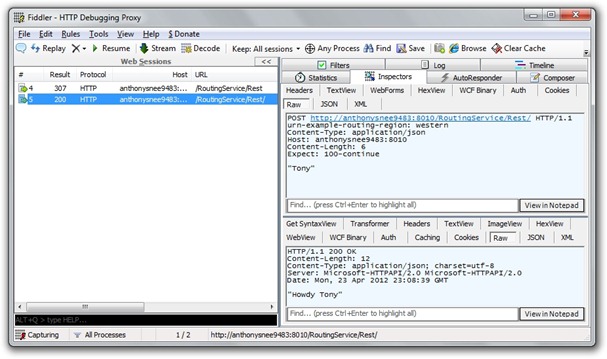
If you look at the message received by the either the router or the downstream service, you won’t see a hint of Json, even when the message sent by the client is clearly Json.  (SerializationHelper is a class I wrote to serialize Xml and Json using WCF’s data contract serializer.)  The reason is that the translation from and to Json is performed by the webHttp endpoint behavior. If you want to see what is actually sent across the wire, you’ll need to employ an HTTP sniffer such as Fiddler.  However, configuring it for use with .NET clients can be a joy (sarcasm intended).  The easiest approach I found was to substitute “localhost” in client endpoint addresses with the actual machine name, which you can store as a setting in app.config.
fiddler-json

Here you can see an HTTP POST message transmitted with a custom routing header, urn-example-routing-region, with a value of “western”.  Both the request and response are formatted as a simple Json string.

WCF will give you all the tools you need to write a scalable, high-performance router with a minimal amount of code.  Making it play nice with Rest, however, requires some effort, as well as familiarity with how WCF deals with Rest-based messages under the covers.  Here are some resources I found helpful in getting my head around WCF addressing and message-handling and the mechanics of building a WCF routing service:

WCF Addressing In Depth (MSDN Magazine June 2007)
WCF Messaging Fundamentals (MSDN Magazine April 2007)
Building a WCF Router, Part 1 (MSDN Magazine April 2008)
Building a WCF Router, Part 2 (MSDN Magazine June 2008)

You can download the code for this post here. Enjoy.

Posted in Technical | Tagged | 26 Comments

Ninject WCF Extensions for RESTful Services

Download the code for this post.

A while ago I blogged about using Ninject for dependency injection with WCF Services.  The advantage of using DI is that it allows you to achieve loose coupling in your application architecture, so that you’re not tightly bound to a particular infrastructure implementation, such as data access or logging.  The problem with WCF services is that by default they are required to have a parameterless constructor, which does not play nice with DI containers, such as Ninject, which support injection of dependencies via constructor parameters.

ninject-wcf-update

I had the need recently to set up a REST-style WCF Services project and wanted to use Ninject for DI with it. Luckily, the Ninject WCF Extension project had been updated to support REST, so I updated the Nuget package and discovered the project would not compile.  I found out that the static KernelContainer class had been deprecated, so I had to refactor my code to remove references to it.  I also noticed there was no longer any need to derive the Global.asax code file from NinjectWcfApplication, because the extension now uses WebActivator to configure Ninject on application startup.  A NinjectWebCommon.cs file is placed in an App_Start folder. There you simply add code to a RegisterServices method in order to load your Ninject modules and perform the bindings. (When updating the NuGet package on the other projects, I had to manually remove the App_Start folder.)

ninject-wcf-app-start

Typically when exposing a REST-type endpoint from a WCF service, you would leverage the ASP.NET UrlRoutingModule by adding a ServiceRoute to the RouteTable in the Application_Start method of your Global.asax.cs file.  Things get a little tricky, however, if you want to expose both SOAP and REST endpoints from the same WCF service.  In this case, you’ll want to supply a ServiceHostFactory-derived class when registering the service route, which let’s you specify an endpoint address that is different than the base HTTP address used for the SOAP endpoint.

public class RestServiceHostFactory<TServiceContract> : NinjectWebServiceHostFactory
{
    protected override ServiceHost CreateServiceHost(Type serviceType, Uri[] baseAddresses)
    {
        ServiceHost host = base.CreateServiceHost(serviceType, baseAddresses);
        var webBehavior = new WebHttpBehavior
        {
            AutomaticFormatSelectionEnabled = true,
            HelpEnabled = true,
            FaultExceptionEnabled = true
        };
        var endpoint = host.AddServiceEndpoint(typeof(TServiceContract), new WebHttpBinding(), "Rest");
        endpoint.Name = "rest";
        endpoint.Behaviors.Add(webBehavior);
        return host;
    }
}

Here is code from Global.asax.cs which references RestServiceHostFactory:

public class Global : HttpApplication
{
    protected void Application_Start(object sender, EventArgs e)
    {
        RegisterRoutes();
    }

    private void RegisterRoutes()
    {
        // Add rest service route
        RouteTable.Routes.Add(new ServiceRoute("GreetingService",
            new RestServiceHostFactory<IGreetingService>(), typeof(GreetingService)));
    }
}

Browsing to the REST-endpoint, and appending /help to the url, displays a list of available operations.

ninject-wcf-rest

In my original blog post on this topic I introduced a NinjectServiceHelper class that can be used by test classes to spin up matching services and clients on the fly.  I refactored this class to support REST scenarios by adding the required endpoint behavior for the WebHttpBinding.

public class NinjectServiceHelper<TServiceContract, TServiceType> : IDisposable
{
    bool _disposed;

    public NinjectServiceHelper(IServiceBehavior serviceBehavior, string address, Binding binding)
    {
        // Create Ninject service host
        _serviceHost = new NinjectServiceHost(serviceBehavior, typeof(TServiceType));

        // Add endpoint
        _serviceHost.AddServiceEndpoint(typeof(TServiceContract), binding, address);

        // Add web behavior
        if (binding.GetType() == typeof(WebHttpBinding))
        {
            var webBehavior = new WebHttpBehavior
            {
                AutomaticFormatSelectionEnabled = true,
                HelpEnabled = true,
                FaultExceptionEnabled = true
            };
            _serviceHost.Description.Endpoints[0].Behaviors.Add(webBehavior);
        }

        // Add service metadata
        var metadataBehavior = new ServiceMetadataBehavior();
        if (binding.GetType() == typeof(BasicHttpBinding))
        {
            metadataBehavior.HttpGetEnabled = true;
            metadataBehavior.HttpGetUrl = new Uri(address);
        }
        _serviceHost.Description.Behaviors.Add(metadataBehavior);

        // Open service host
        _serviceHost.Open();

        // Init client
        var factory = new ChannelFactory<TServiceContract>(binding);
        _client = factory.CreateChannel(new EndpointAddress(address));
    }

    private readonly ServiceHost _serviceHost;
    public ServiceHost ServiceHost
    {
        get
        {
            if (_disposed)
                throw new ObjectDisposedException("NinjectServiceHelper");
            return _serviceHost;
        }
    }

    private readonly TServiceContract _client;
    public TServiceContract Client
    {
        get
        {
            if (_disposed)
                throw new ObjectDisposedException("NinjectServiceHelper");
            return _client;
        }
    }

    public void Dispose()
    {
        if (!_disposed)
        {
            ((IDisposable)_serviceHost).Dispose();
            ((IDisposable)_client).Dispose();
            _disposed = true;
        }
    }
}

The test class then loads a Ninject module in the TestFixtureSetup method that adds named bindings to the kernel for SOAP and REST WCF endpoints.

public class ServicesModule : NinjectModule
{
    public override void Load()
    {
        // Basic service host
        Kernel.Bind<NinjectServiceHelper<IGreetingService, GreetingService>>()
            .ToSelf()
            .Named("Basic")
            .WithConstructorArgument("address", "http://localhost:1234/GreetingService/Soap/")
            .WithConstructorArgument("binding", new BasicHttpBinding());

        // Tcp service host
        Kernel.Bind<NinjectServiceHelper<IGreetingService, GreetingService>>()
            .ToSelf()
            .Named("Tcp")
            .WithConstructorArgument("address", "net.tcp://localhost:9999/GreetingService/Tcp/")
            .WithConstructorArgument("binding", new NetTcpBinding());

        // Rest service host
        Kernel.Bind<NinjectServiceHelper<IGreetingService, GreetingService>>()
            .ToSelf()
            .Named("Rest")
            .WithConstructorArgument("address", "http://localhost:1234/GreetingService/Rest/")
            .WithConstructorArgument("binding", new WebHttpBinding());
    }
}

The test methods then obtain the appropriate helper instance by name.

private void Greeting_Soap(string protocol)
{
    // Arrange
    using (var helper = _kernel.Get<NinjectServiceHelper<IGreetingService, GreetingService>>(protocol))
    {
        using ((IDisposable)helper.Client)
        {
            // Act
            string greeting = helper.Client.Hello();

            // Assert
            Assert.That(greeting, Is.StringMatching("Hello"));
        }
    }
}

private void Greeting_Rest(string format)
{
    using (var helper = _kernel.Get<NinjectServiceHelper<IGreetingService, GreetingService>>("Rest"))
    {
        // Arrange
        var client = new WebClient();
        if (format == "Json")
            client.Headers.Add(HttpRequestHeader.Accept, "application/" + format);
        client.BaseAddress = helper.ServiceHost.Description.Endpoints[0].Address.ToString();

        // Act
        string result = client.DownloadString("Hello");
        string greeting;
        if (format == "Xml")
            greeting = SerializationHelper.DeserializeXml<string>(result);
        else if (format == "Json")
            greeting = SerializationHelper.DeserializeJson<string>(result);
        else
            throw new Exception("Format not supported: " + format);

        // Assert
        Assert.That(greeting, Is.StringMatching("Hello"));
    }
}

My SerializationHelper class simplifies the task of converting Xml and Json to and from CLR objects.

public class SerializationHelper
{
    public static string SerializeXml<T>(T obj)
    {
        using (var ms = new MemoryStream())
        {
            var serializer = new DataContractSerializer(typeof(T));
            serializer.WriteObject(ms, obj);
            string retVal = Encoding.Default.GetString(ms.ToArray());
            return retVal;
        }
    }

    public static T DeserializeXml<T>(string xml)
    {
        using (var reader = new StringReader(xml))
        {
            using (var xmlReader = XmlReader.Create(reader))
            {
                var serializer = new DataContractSerializer(typeof(T));
                var obj = (T)serializer.ReadObject(xmlReader);
                return obj;
            }
        }
    }

    public static string SerializeJson<T>(T obj)
    {
        using (var ms = new MemoryStream())
        {
            var serializer = new DataContractJsonSerializer(typeof(T));
            serializer.WriteObject(ms, obj);
            string retVal = Encoding.Default.GetString(ms.ToArray());
            return retVal; 
        }
    }

    public static T DeserializeJson<T>(string json)
    {
        using (var ms = new MemoryStream(Encoding.Unicode.GetBytes(json)))
        {
            var serializer = new DataContractJsonSerializer(typeof(T));
            var obj = (T)serializer.ReadObject(ms);
            return obj; 
        }
    }
}

Ninject’s WCF extension makes it easy to build both SOAP and REST style WCF services that use dependency injection for apps that are loosely coupled to specific infrastructure implementations.  The project examples up on GitHub also demonstrate self-hosting scenarios.

Download the code for this blog post here.

Posted in Technical | Tagged , | 7 Comments

SSD + SATA = Best of Both Worlds

Every once and a while I pull something off that makes me smile.  I experienced this sensation last week when I swapped out the DVD drive in my MacBook Pro and replaced it with the 500 GB SATA hard drive that came with the machine.  When I first got the laptop, I purchased a lightening-fast 240 GB SSD hard drive to replace the 500 GB drive, and I put the original drive in a case to use it for Time Machine backups.  While I enjoyed the improved speed of the solid state drive, I soon ran out of space.  I used Disk Inventory X to try and figure out where all the space went and was able to free up some of it, but I also run a Windows 7 virtual machine using Parallels Desktop, which takes up about 70 GB, and the rest of the space was taken up by stuff I wanted to keep or was difficult to extricate.  The 240 GB SSD cost me about $300 on Amazon, but upgrading to 480 GB would have run me close to $800 – too painful.  Besides, a lot of space is for things like videos and audio that don’t need the blinding speed of SSD, which I wanted to reserve for the stuff I use all the time, like the main OS, programs, documents, and my Windows VM.

mce-drive

The natural solution was to purchase use a more economical SATA drive as a supplemental storage device, but I dreaded the idea of having to plug one into the USB port whenever I wanted to access some media.  Then I ran across an article describing how to install a second hard drive into a MacBook Pro by removing the optical DVD drive and placing it in a separate enclosure.  This made perfect sense to me, since I hardly ever play CD’s or DVD’s using my computer.  So I went ahead and purchased the kit for about $100 and set about performing the operation.  However, the instructions that came with it did not cover my model (early 2011) and were too high level for me to feel confident about.  Thankfully, the support folks for the kit sent me a link to a very good set of instructions for removing the optical drive.  It was tricky (especially when it came to putting all the screws back in the right way), but I managed to pull it off.  I took out the DVD drive, placed it in the enclosure that came with the kit, then inserted the 500 GB SATA that came with the machine, and voila! I had a total 740 GB of storage internal to my laptop.

The next step was to free up space on the SDD by moving files over to the SATA.  That’s where Disk Inventory X came in handy, helping me identity the largest files.  However, what I really wanted to do was configure iTunes to use the SATA for its media location.  I found useful information on how to do that.  While I was at I, I moved iPhoto, MobileSync, and even my Mail folders.  I kept my applications, Windows VM and most of my documents on the SSD to take advantage of faster access speed, but placed the other stuff on the SATA, as well as space-hogging video files.  I am quite satisfied with the result, and I haven’t seen problems with heat or battery drain.

The main reason I jettisoned my PC in favor of a Mac was pure and simple: better hardware.  With my Dell laptop, I had to lug around this huge brick for the power supply, which had to be replaced every 6 months. I also had to buy a fan to keep it cool, and the battery life was less than 2 hours. With the Mac, I don’t need an extra fan, and the power supply is a light little square with a small magnetic connector.  And I get several hours battery life – even when running Windows.  I do use Mac OS X Lion for things like contacts, calendar and mail, but with iCloud everything is automatically synced across all my other devices.  You guessed it: my iPhone and iPad.  There are a lot of also-rans in the phone and tablet spaces, but when it comes to consumer bliss, there’s a lot to be said for the vision Steve Jobs had for software-hardware integration.

Posted in Personal, Technical | Tagged | 2 Comments

Simple MVVM Toolkit for Silverlight 5.0, Windows Phone 7.1

I’ve just upgraded my Simple MVVM Toolkit to support Silverlight 5.0 and Windows Phone 7.1!  You can download the latest version here and take it for a spin – or get it from the Visual Studio Extensions Gallery by opening Visual Studio and selecting Extensions Manager from the Tools menu. Before you run the installer, however, you should install the prerequisites, which now include Silverlight 5 Tools and Toolkit, Expression Blend Preview for Silverlight 5 (this will be replaced by the Blend 5 SDK when it comes out), and the Windows Phone SDK 7.1.

sl4-5

You can still use the toolkit to develop MVVM apps for Silverlight 4 if you wish, and the Visual Studio project templates include versions for both Silverlight versions – 4 and 5.  The project templates for a plain vanilla Silverlight apps, as well as Silverlight apps using WCF RIA Services, allow you to choose which version of Silverlight you want to use.  You still get all the source code, supporting libraries, and an abundance of samples.  If you have questions or comments, feel free to post them on the project discussion board.  And if you’re getting up to speed on MVVM with the toolkit, be sure to check out the Getting Started screencast.  Then when you’re ready, watch the Real-World screencasts.

I’ve also updated the NuGet packages for Simple MVVM Toolkit.  To get those, install the NuGet package manager from the Extensions Manager command under the Tools menu, then search for “SimpleMvvm” and select a package to install, depending on the type of project you have: WPF, Windows Phone, Silverlight 4 or Silverlight 5.  I preserved the existing Silverlight package for SL4, but I added a new package, Silverlight5, for SL5.  The packages used to include the entire installer but now only contain the binaries and a readme text file.  While I encourage most folks to run the installer to get the code snippets and Visual Studio templates, there are cases where all you want is the toolkit DLL and its supporting assemblies.  In that case, installing the NuGet package would be your preferred route.  Otherwise, run the full installer from the CodePlex site and you’ll get the entire Simple MVVM Toolkit experience.

Enjoy!

Posted in Technical | Tagged | 21 Comments

Screening C# Candidates: Let’s Play 20 Questions!

Over the past year I was involved in the process of interviewing candidates for both mid and senior level developer positions.  We would bring them in for a face-to-face interview, sometimes with multiple interviewers, only to find out they were unable to answer the most basic technical questions concerning C# and .NET.  I’m of the persuasion that every .NET developer should understand basic concepts, such as C# language syntax, inheritance, generics, memory management, threading, etc. Without such an understanding, a developer can end up writing apps that are shot-through with problems that make the code difficult to debug and maintain.

Furthermore, I’m looking for a developer with a thirst for knowledge.  The technical landscape is constantly shifting, and developers need to come up to speed quickly if they are going to be able to leverage latest enhancements to the platform.  In addition, the breadth of the technical spectrum is mind-boggling, and a developer needs the capacity to absorb vast quantities of knowledge from various parts of the framework.  For example, someone might be called upon to build a WPF app retrieving data from a WCF service that queries a SQL database using Entity Framework with Ninject for dependency injection and MOQ for unit testing.  If a developer has a grasp of the fundamentals of C# and .NET, it tells me they are motivated to dig deeper to understand how things work under the covers, and take the time to acquire technical expertise both through reading and hands-on coding.

In a face-to-face interview, I can take time to ask probing questions and get a fairly good feel for a candidate’s technical prowess.  However, there needs to be a process to screen out candidates who lack even the most basic understanding of .NET fundamentals.  This is the purpose of the technical phone screen.  It should take no more than 15 minutes to conduct, and ideally it can be administered by a non-technical person, such as a project manager or technical recruiter.  For this purpose I have composed a list of 20 Questions, each of which has a one or two word answer.  Here is the list of questions without answers, which you can use to quiz yourself (see the end of the post for the answers).

C# Phone Screen Questions (without Answers)

1. What kind of type is a string?
2. What kind of type is a double?
3. What keyword defines a custom value type?
4. Can a class have more than one direct base class?
5. What keyword makes a member visible to inherited classes?
6. What keyword makes a class visible only within its assembly?
7. What keyword allows a method to be overridden?
8. What keyword requires a method to be overridden?
9. What keyword prevents a class from being used as a base class?
10. What keyword returns true if a cast will succeed?
11. What keyword returns null if a cast will not succeed?
12. What keyword ensures code execution even if an exception occurs?
13. What keyword calls IDisposable.Dispose?
14. What keyword constrains a generic type argument to derive from a particular class?
15. What two keywords used together return IEnumerable<T>?
16. What keyword would you use to define an inline variable in a LINQ query?
17. What keyword brings an extension method into scope?
18. What keyword do you add to a delegate to force subscribers to use += or –=?
19. What method do you call on a delegate to run it on a background thread?
20. What keyword provides thread synchronization?

The nice thing about this approach is that is should not take just a few minutes to administer, it can be given by anyone regardless of technical background, and the answers are fairly cut and dried.  Of course, the questions are not meant to be exhaustive and are only scratching the surface of CLR and C# fundamentals.  Just because someone can answer them does not mean they have a firm grasp of the .NET type system, garbage collection mechanics, JIT compilation issues, or multi-threading synchronization techniques.  Neither do the questions touch on any of the “pillars” of the .NET Framework API, such as data access (Entity Framework), web services (WCF), or presentation platforms (WPF, SL, ASP.NET MVC).  Nor do they attempt to ascertain logical or critical thinking ability. The only way to test for those things is to perform an in-depth technical interview performed by a senior technical specialist.  This is not to say that a mid-level developer will know all there is to know. What you are really looking for is not raw knowledge per se, but the capacity to absorb and integrate technical knowledge and the desire to know how things work.  If a person has ever bothered to read a book or technical article or taken a training course, their answers will set them apart from the crowd of folks who don’t make time for ongoing professional development.

If you’re reading this blog post and want to know where to begin, my first suggestion would be to run, not walk, to nearest bookseller or online bookstore and pick up Jeffrey Richter’s CLR via C#, which is presently in its third edition.  My short list for the books on various .NET API’s is Programming Entity Framework by Julie Lerman, Programming WCF Services by Juval Lowy, Essential WPF by Chris Anderson, Silverlight 4 in Action by Pete Brown, and Pro ASP.NET MVC by Steve Sanderson.

Best of luck on your career development!

C# Phone Screen Questions (with Answers):

1. What kind of type is a string?
    > reference
2. What kind of type is a double?
    > value
3. What keyword defines a custom value type?
    > struct
4. Can a class have more than one direct base class?
    > no
5. What keyword makes a member visible to inherited classes?
    > protected
6. What keyword makes a class visible only within its assembly?
    > internal
7. What keyword allows a method to be overridden?
    > virtual
8. What keyword requires a method to be overridden?
    > abstract
9. What keyword prevents a class from being used as a base class?
    > sealed
10. What keyword returns true if a cast will succeed?
    > is
11. What keyword returns null if a cast will not succeed?
    > as
12. What keyword ensures code execution even if an exception occurs?
    > finally
13. What keyword calls IDisposable.Dispose?
    > using
14. What keyword constrains a generic type argument to derive from a particular class?
    > where
15. What two keywords used together return IEnumerable<T>?
    > yield return
16. What keyword would you use to define an inline variable in a LINQ query?
    > let
17. What keyword brings an extension method into scope?
    > using
18. What keyword do you add to a delegate to force subscribers to use += or –=?
    > event
19. What method do you call on a delegate to run it on a background thread?
    > BeginInvoke
20. What keyword provides thread synchronization?
    > lock

Posted in Technical | Tagged | 45 Comments

2011 Recap

After a rather long break from blogging, it’s time for me to jump back in!  I thought I would start by taking a look back at 2011 and recapping some of my experiences, with a sneak peek at blogging topics I plan to cover in the next several weeks.

On a personal level, we added a new member to our family: Kornelius Aaron Sneed, born February 8, 2011.  He is the youngest of our three children.  My oldest is Kerrigan, age 6, followed by Karisma, age 3.  My wife, Zuzana, holds the whole family together.

Sneed Kids

From a professional standpoint, 2011 was also an interesting year.  I continued to work as an instructor for DevelopMentor, but I started to spend much more time doing hands-on software development for various clients in the Dallas area.  My first client was a pharmaceutical distribution company that was porting two applications, one a Windows Forms app and the other an ASP.NET app, over to a single Silverlight app that would run both in-browser and out-of-browser.  That gig ended in July, when I picked up some WCF work in Fort Worth building an external-facing REST-ful WCF service, as well as some internal-facing queued WCF services.  Then I picked up an ASP.NET MVC project in Plano, Texas, creating a web portal hosting several ASP.NET and Silverlight apps.  That morphed into a project building a Security Token Service using Windows Identity Foundation by customizing the Thinktecture Identity Server authored by Dominick Baier.

It was at that time that I decided to write my own MVVM Toolkit, which I called “Simple MVVM Toolkit,” first targeting it for Silverlight, and then adding support for both WPF and Windows Phone.  It took me a few weeks to put out the first version.  Then I spent the better part of the next four months adding features, putting together sample apps and documentation, writing an installer, and performing some screencasts.  I also spent a great deal of time answering questions posted to my blog and the project discussion board at CodePlex.  My New Year’s resolution is to incorporate some requested features and add support for Silverlight 5.

With the advent of my toolkit, I started blogging more often, holding forth on a variety of topics, including WCF, REST, Data Services, ASP.NET MVC, and the Onion Architecture.  In June of 2010, when I migrated my blog to WordPress.com, I was receiving about 3,000 hits per month.  Now it’s over 11,000 visitors per month, with 110 followers from all over the world.  In the past 12 months I’ve had over 15,000 downloads of my Simple MVVM Toolkit.  The project discussion board has over 100 threads, and the Silverlight-MVVM Facebook Group has 34 members.  What’s so cool about all this is the ability to have an impact and help others, even if they’re halfway around the globe.

On a more controversial note, last year I took the plunge and bought a 13” Apple MacBook Pro.  I had owned a Dell Inspiron prior to that, but it was constantly overheating and I had to replace the power cord twice (at over $100 a pop).  I already owned an iPhone and had purchased an iPad.  So when the hard drive on my Dell started to fail, and researched the cost of going with a Mac.  In total, it cost me about $2,000, with an i7 Intel processor, 8 GB of RAM and a 240 GB solid state drive (which was not large enough).  I bought the drive separately and swapped out the 500 GB SATA drive that came with the laptop, placing it in a case to use for backups.  My main concern was how well I could run Windows on a Mac, but running Windows 7 using Parallels in Coherence mode made the experience nearly seamless.  Making this move came with a tinge of nostalgia, because my very first computer was the original Mac, which I purchased in 1984 and came with a single floppy (no hard drive) and 128K of RAM.  Ironically, I paid $2,000 for it, which in today’s dollars amounts to $4000.

So what’s next for blogging?  There are a couple of miscellaneous topics I’d like to cover, such as Behavior-Driven Development with SpecFlow, and some highlights of a presentation I did last Fall in WCF Data Services.  Then I’d like to share what I learned about Windows Identity Foundation and the experience of customizing an open-source Security Token Service to achieve centralized authentication and authorization within an enterprise; how to perform single sign-in and support claims in a Silverlight app; and an approach to single sign-out and global session management across multiple applications secured by the same STS.

Cheers,
Tony

Posted in Personal | 2 Comments

OData, Where Art Thou?

Gave a talk last night to the Dallas .NET Developer Group on OData and WCF Data Services.

odata-logo

I’ll update this post with some info on the topic, but in the meantime you can download the slides and code for the talk here: http://bit.ly/odata-talk. Enjoy.

UPDATE: You can find a recording of this talk posted here: http://usergroup.tv/videos/odata-where-art-thou-publishing-odata-feeds-with-wcf-data-services.

Posted in Technical | Tagged , , | Leave a comment