More NLog Goodness

This is a follow-up to my post on Using NLog with Dependency Injection.  There I showed how you can abstract away a specific logging implementation from your application by implementing a common interface and using a DI container, such as Ninject or StructureMap, to resolve the concrete implementation at runtime.  This time around, I thought I would call out a few more features of NLog which I found useful.

Download the code for this blog post.

One of the most common uses of logging is to record log entries in a database table. NLog has an interesting feature that allows you to include the table definition in your NLog.config file and run a command-line utility to create the database and logging table, as well as set up other targets, such as a Windows Event Log or performance counters.  To take advantage of this feature, you need to run the NLog installer, which you can download from here.  This will give you the documentation, Visual Studio item templates for sample configuration files, schemas for XML intellisense in config files, extended layout renderers, and the config-driven installer utility.
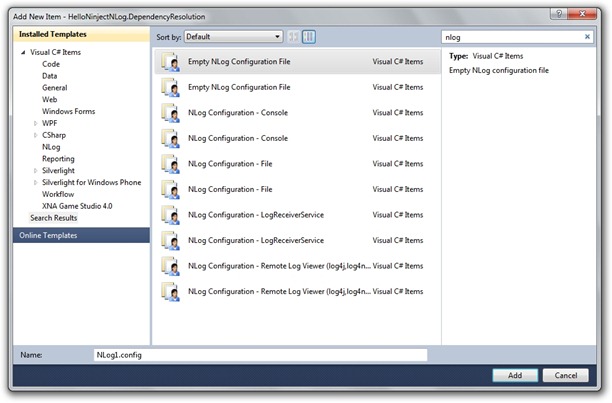
nlog-items

To find these goodies, you need to go to the directory where NLog is installed after running the setup program, which is probably “%ProgramFiles(x86)%\NLog\.NET Framework 4.0”.

nlog-install-dir

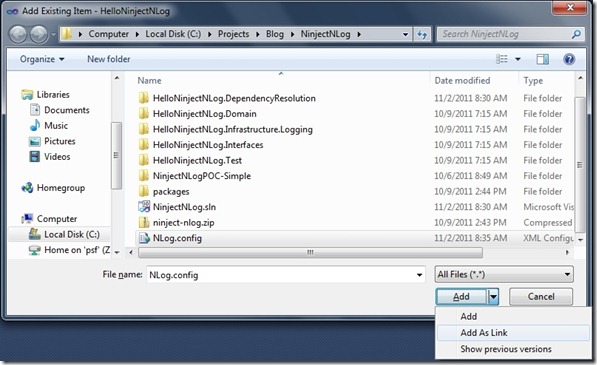
A common question is where to place the NLog config file.  There are a number of options.  If you want to perform logging at the class library level, and perhaps have a logging test project, you may want to place the NLog.config at the solution level, and link to it from projects where you want to perform logging.  To do this, right-click on the project and select Add Existing Item.  Then navigate to the solution directory where you placed the NLog.config file and, instead of clicking the Add button, select the drop-down on the Add button and choose Add As Link.
add-as-link

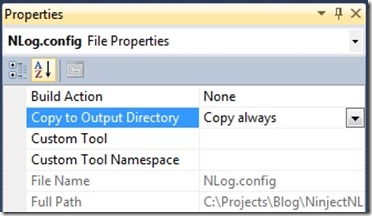
Then select properties for the linked file and set Copy to Output Directory to “Copy Always.”
nlog-props

For web apps, you’ll probably need to have a physical NLog.config file in the root directory (with Copy to Output Directory set to “Do Not Copy”), because placing the file in the bin directory does not seem to work (regardless of what the documentation states).

One change I wanted to make to my log output is to include the identity of the current user.  If you look at the list of built-in layout renderers, you’ll find the ${identity} tag, which provides the identity of the thread’s current principal.

static void Main(string[] args)
{
    // Set user identity
    Thread.CurrentPrincipal = new WindowsPrincipal(WindowsIdentity.GetCurrent());

    // Other code follows ...
}

In web applications, this will give you the application pool’s identity rather the end user’s identity.  The ${aspnet-user-identity} tag will return the identity of the logged on user, but you can use only this tag if you reference the NLog.Extended.dll assembly.  If you’re using NLog via NuGet, add the NLog for Extended Profile package, which will add the reference.

nlog-ext

For an ASP.NET MVC app, you’ll need to include pieces from the Internet Application MVC3 template to enable users to authenticate via a LogOn view.
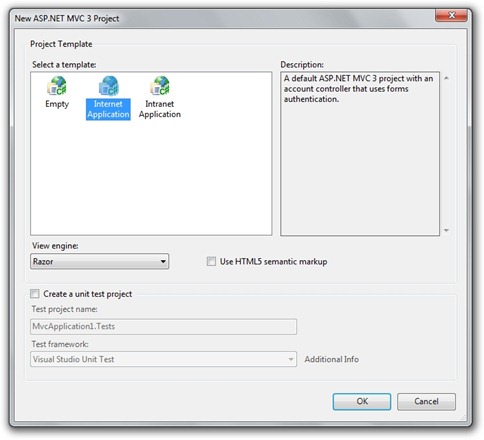
mvc-int

All you have to do to log on is run the app and register as a new user.  A database will be created according to the “ApplicationServices” connection string in web.config.
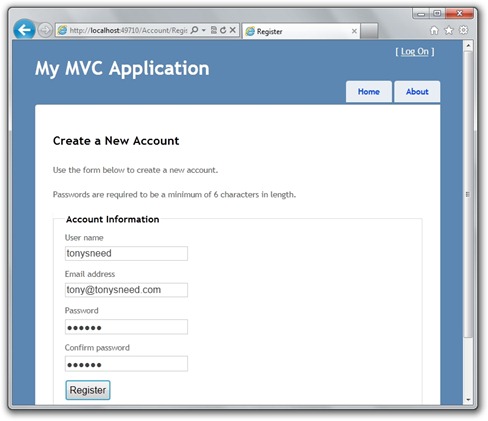
asp-user-reg

The next piece is enabling database logging. For this you simply create a logging target with xsi:type=”Database”.  One of the issues I ran into is specifying the date-time in a format SQL Server understands. The ${date} tag accepts a format parameter that can be any argument accepted by DateTime.ToString(format). I found the standard “s” Sortable Format Specifier to be a good choice.

<target name="database"
        xsi:type="Database">

  <!-- SQL command to be executed for each entry -->
  <commandText>INSERT INTO LogEvent(EventDateTime, EventLevel, UserName, MachineName, EventMessage, ErrorSource, ErrorClass, ErrorMethod, ErrorMessage, InnerErrorMessage) VALUES(@EventDateTime, @EventLevel, @UserName, @MachineName, @EventMessage, @ErrorSource, @ErrorClass, @ErrorMethod, @ErrorMessage, @InnerErrorMessage)</commandText>

  <!-- parameters for the command -->
  <parameter name="@EventDateTime" layout="${date:s}" />
  <parameter name="@EventLevel" layout="${level}" />
  <parameter name="@UserName" layout="${identity}" />
  <parameter name="@MachineName" layout="${machinename}" />
  <parameter name="@EventMessage" layout="${message}" />
  <parameter name="@ErrorSource" layout="${event-context:item=error-source}" />
  <parameter name="@ErrorClass" layout="${event-context:item=error-class}" />
  <parameter name="@ErrorMethod" layout="${event-context:item=error-method}" />
  <parameter name="@ErrorMessage" layout="${event-context:item=error-message}" />
  <parameter name="@InnerErrorMessage" layout="${event-context:item=inner-error-message}" />

  <!-- connection string -->
  <dbProvider>System.Data.SqlClient</dbProvider>
  <connectionString>Data Source=.\SQLEXPRESS;Initial Catalog=Logging;Integrated Security=True</connectionString>

</target>

If you try running this straight away, you won’t notice anything unusual, even though no database logging has taken place – because you haven’t even created the database!  If you want to find out if there’s a problem with logging, one thing you can do is configure the logger to throw exceptions.  This will cause an exception to be raised in the logger if NLog cannot initialize a target, but problems writing to the database won’t come up. For that you’ll want to log internal NLog exceptions.

nlog-console-error

You can log them to the console, but in a real-world scenario, you’ll want to log NLog internal errors to a text file.  That way, you can inspect it on the server where your app is deployed.

<nlog xmlns="http://www.nlog-project.org/schemas/NLog.xsd"
      xmlns:xsi="http://www.w3.org/2001/XMLSchema-instance"
      throwExceptions="true"
      internalLogLevel="Error"
      internalLogFile="..\..\..\nlog-app.log">

This relative path will place the log in the solution directory for the project.  However, the location of the internal log file for a web app will need to be determined at runtime, based on Server.MapPath.  This means you’ll need to set the log file path in the Application_Start method of Global.asax.cs.

public class MvcApplication : System.Web.HttpApplication
{
    protected void Application_Start()
    {
        string nlogPath = Server.MapPath("nlog-web.log");
        InternalLogger.LogFile = nlogPath;
    }
}

Now that we can see errors generated by NLog, we need to create the database and table where we want to store our logs.  NLog comes with a handy command-line tool called InstallNLogConfig.exe, which you can run on your NLog.config file.  If the config file includes information about the definition of the database table, this tool will create the table for you.  You can even have it drop and re-create the logging database.  The tool will also create the windows event log or performance counters if those targets are specified.

<!-- command to install logging database -->
<install-command>
  <text>CREATE DATABASE Logging</text>
  <connectionString>Data Source=.\SQLEXPRESS;Initial Catalog=Master;Integrated Security=True</connectionString>
  <ignoreFailures>true</ignoreFailures>
</install-command>

<!-- command to create logging table -->
<install-command>
  <text>
    CREATE TABLE LogEvent(
    EventId int primary key not null identity(1,1),
    EventDateTime datetime,
    EventLevel nvarchar(50),
    UserName nvarchar(50),
    MachineName nvarchar(1024),
    EventMessage nvarchar(MAX),
    ErrorSource nvarchar(1024),
    ErrorClass nvarchar(1024),
    ErrorMethod nvarchar(1024),
    ErrorMessage nvarchar(MAX),
    InnerErrorMessage nvarchar(MAX))
  </text>
</install-command>

<!-- command to drop logging database -->
<uninstall-command>
  <text>DROP DATABASE Logging</text>
  <connectionString>Data Source=.\SQLEXPRESS;Initial Catalog=Master;Integrated Security=True</connectionString>
  <ignoreFailures>true</ignoreFailures>
</uninstall-command>

Logging is one of those things we can take for granted – until we need it.  NLog is a nice tool that can provide logging to multiple targets.  I’ve just scratched the surface on what NLog can do.  For more info, check out the NLog docs and download the NLog source code, which includes some good examples.  You can download the code for this post here.  Enjoy.

Posted in Technical | Tagged | 1 Comment

Using Ninject with WCF Services

Download the code for this post.

Update: This post is based on a older version of Ninject WCF Extensions. For an example of using the new version with REST support, see this post.

In my post on the Onion Architecture I highlight the use of Dependency Injection to loosen the coupling between application components.  In an ASP.NET MVC application, it is possible to use repositories directly from controllers, but it may be desirable to place a WCF services façade over the data access layer, so that other kinds of clients, such as Silverlight or WPF, won’t directly access the database.  This is commonly referred to as an n-tier application architecture.

For a service type to rely on a DI container for a repository interface, it would likely have a constructor that accepts an I_X_Repository parameter.

public class GreetingService : IGreetingService {
    private IGreetingRepository _greetingRepo;

    public GreetingService(IGreetingRepository greetingRepo)
    {
        _greetingRepo = greetingRepo;
    }

    public string Hello()
    {
        return _greetingRepo.GetGreeting();
    }
}

However, using this service type will result in an error: “The service type provided could not be loaded as a service because it does not have a default (parameter-less) constructor.”

service-error

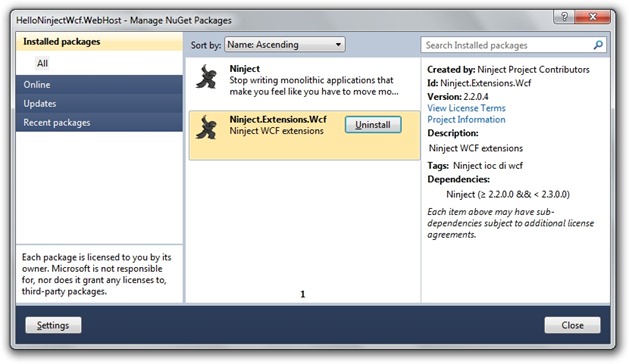
To remedy this, you can use a custom instance provider to obtain the GreetingService from a DI container.  Thankfully, there is a NuGet package available that provides this service: Ninject.Extensions.Wcf.

ninject-wcf

To use this for a non-web host, set the KernelContainer’s Kernel property to an kernel initialized with a Ninject module that binds your types and interfaces.  Then use NinjectServiceHost in lieu of ServiceHost.

class Program {
    static void Main(string[] args)
    {
        // Init Ninject IKernel kernel = new StandardKernel(new HelloModule());
        KernelContainer.Kernel = kernel;

        // Create service host using (var host = new NinjectServiceHost(typeof(GreetingService),
            new Uri("http://localhost:1234/GreetingService")))
        {
            host.Open();
            Console.ReadKey();
        }
    }
}

The HelloModule binds both IGreetingRepository and ServiceHost.

public class HelloModule : NinjectModule {
    public override void Load()
    {
        Kernel.Bind<IGreetingRepository>().To<GreetingRepository>();
        Kernel.Bind<ServiceHost>().To<NinjectServiceHost>();
    }
}

In the .svc file for a web host, you would set the Factory property to NinjectServiceHostFactory.

<%@ ServiceHost Service="HelloNinjectWcf.Service.GreetingService" Factory="Ninject.Extensions.Wcf.NinjectServiceHostFactory" %>

Then add a Global.asax file that extends NinjectWcfApplication and overrides CreateKernel to return an initialized Ninject kernel.

public class Global : NinjectWcfApplication {
    protected override IKernel CreateKernel()
    {
        IKernel kernel = new StandardKernel(new HelloModule());
        return kernel;
    }
}

This works great for configuring a WCF service to use dependency injection, but there are times when you might need to spin up a WCF service for an integration test using a testing framework such as NUnit or MSTest.  This can get rather tedious, especially with DI in the mix.  For that reason, it’s convenient to use a helper class responsible for initializing both service host and client.  (Disclaimer: I have to credit my friend, Pete Young, for coming up with a helper that does this same sort of thing.)

public class NinjectServiceHelper<TServiceContract, TServiceType> : IDisposable {
    bool _disposed;

    public NinjectServiceHelper(string address, Binding binding, params Uri[] baseAddresses)
    {
        // Init Ninject service host _serviceHost = new NinjectServiceHost(typeof(TServiceType), baseAddresses);
        _serviceHost.AddServiceEndpoint(typeof(TServiceContract), binding, address);
        _serviceHost.Open();

        // Init client var factory = new ChannelFactory<TServiceContract>(binding);
        _client = factory.CreateChannel(new EndpointAddress(address));
    }

    private readonly ServiceHost _serviceHost;
    public ServiceHost ServiceHost 
    {
        get {
            if (_disposed)
                throw new ObjectDisposedException("NinjectServiceHelper");
            return _serviceHost; 
        }
    }

    private readonly TServiceContract _client;
    public TServiceContract Client
    {
        get {
            if (_disposed)
                throw new ObjectDisposedException("NinjectServiceHelper");
            return _client;
        }
    }

    public void Dispose()
    {
        if (!_disposed)
        {
            ((IDisposable)_serviceHost).Dispose();
            ((IDisposable)_client).Dispose();
            _disposed = true;
        }
    }
}

The code in the Test class then becomes nice and clean.

[TestFixture]
public class GreetingServiceTests {
    private NinjectServiceHelper<IGreetingService, GreetingService> _serviceHelper;

    [TestFixtureSetUp]
    public void FixtureSetup()
    {
        // Init Ninject IKernel kernel = new StandardKernel(new HelloModule());
        KernelContainer.Kernel = kernel;

        // Create service host _serviceHelper = new NinjectServiceHelper<IGreetingService, GreetingService>
            ("http://localhost:2345/GreetingService", new BasicHttpBinding());
    }

    [TestFixtureTearDown]
    public void FixtureTearDown()
    {
        ((IDisposable)_serviceHelper).Dispose();
    }

    [Test]
    public void Greeting_Method_Should_Return_Hello()
    {
        IGreetingService client = _serviceHelper.Client;
        using ((IDisposable)client)
        {
            string greeting = client.Hello();
            Assert.That(greeting, Is.StringMatching("Hello"));
        }
    }
}

Ninject.Extensions.Wcf makes it easy to leverage Ninject for dependency injection with WCF services.  My NinjectServiceHelper makes it easier to write integration tests that spin up the service and at the same time provides a client for invoking methods on the service and writing asserts on the results.  You can download the code for this blog post here.  Enjoy.

Posted in Technical | Tagged , , | 11 Comments

Global Error Handling in ASP.NET MVC 3 with Ninject

Download the code for this blog post.

In my last blog post I explained how to decouple infrastructure concerns, such as logging, from the rest of your application using a Dependency Injection container, such as Ninject. I implemented an ILoggingService interface with an open-source logger called NLog.  In this post I will show you how to implement centralized error handling in an ASP.NET MVC 3 application, so that you can handle exceptions in one place, where you can perform logging as well as display a custom error page.

One of the worst things you can do to handle errors is place a try / catch block in every action of every controller.  Not only does it clutter the app with unnecessary code, it creates the possibility that you or another developer will forget to place the try / catch on an action and an unexpected exception will slip through.

A better approach is to handle exceptions in one place through an interception mechanism.  ASP.NET MVC allows you to hook into the request pipeline by defining an Action Filter.  In fact, one such filter that comes out of the box is a HandleError attribute.  While it allows you to direct users to a particular view when certain errors occur, you cannot use it to log the exception.  The other problem is that you would have to place the attribute on every controller in your application – not much of an improvement over a proliferation of try / catch’s.

It turns out, however, that implementing IExceptionFilter is quite easy (especially if you use Reflector to reverse engineer HandleErrorAttribute Winking smile).  The difference is that you can add a constructor which accepts an ILoggingService interface and is injected into the filter by your DI container.  The nice thing about Ninject is that there is an extension for MVC3 apps, which you can easily add as a NuGet package.  After installing the package, you get a NinjectMVC3.cs file placed in an App_Start folder with bootstrapping code.  There you can load a Ninject module for binding the ILoggingSservice to a concrete implementation.  I had to hunt for the source code and documentation for the Ninject.MVC3 extension, but I eventually found it here on Github.

I implemented IExceptionFilter in a HandleExceptionFilter class, which performs logging in addition to creating a ViewResult with a custom error view.

public class HandleExceptionFilter : IExceptionFilter
{
    private string _view;
    private string _master;
    private ILoggingService _loggingService;

    public HandleExceptionFilter(ILoggingService loggingService, string master, string view)
    {
        _loggingService = loggingService;
        _master = master ?? string.Empty;
        _view = view ?? string.Empty;
    }

    public virtual void OnException(ExceptionContext filterContext)
    {
        if (filterContext == null)
        {
            throw new ArgumentNullException("filterContext");
        }

        if (!filterContext.IsChildAction && (!filterContext.ExceptionHandled
            && filterContext.HttpContext.IsCustomErrorEnabled))
            {
            Exception exception = filterContext.Exception;
            if ((new HttpException(null, exception).GetHttpCode() == 500))
            {
                // Log exception
                _loggingService.Error(exception);

                // Show error view
                ErrorFilterHelper.SetFilerContext(filterContext, _master, _view);
            }
        }
    }
}

I consolidated code to show the error view in an ErrorFilterHelper.

internal static class ErrorFilterHelper
{
    public static void SetFilerContext(ExceptionContext filterContext, string master, string view)
    {
        // Show error view
        string controllerName = (string)filterContext.RouteData.Values["controller"];
        string actionName = (string)filterContext.RouteData.Values["action"];
        var model = new HandleErrorInfo(filterContext.Exception, controllerName, actionName);
        var result = new ViewResult
        {
            ViewName = view,
            MasterName = master,
            ViewData = new ViewDataDictionary<HandleErrorInfo>(model),
            TempData = filterContext.Controller.TempData
        };
        filterContext.Result = result;
        filterContext.ExceptionHandled = true;
        filterContext.HttpContext.Response.Clear();
        filterContext.HttpContext.Response.StatusCode = 200;
        filterContext.HttpContext.Response.TrySkipIisCustomErrors = true;
    }
}

The next issue is how to insert HandleExceptionFilter into the pipeline.  Luckily Ninject.MVC3 comes with a BindFilter extension method which allows you to bind action filters to classes implementing IActionFilter.  To use it simply add a using directive for Ninject.Web.Mvc.FilterBindingSyntax, then supply a type argument for your filter.

private static void RegisterServices(IKernel kernel)
{
    // Load logging module
    kernel.Load(new LoggingModule());

    // Bind exception handling filter
    kernel.BindFilter<HandleExceptionFilter>(FilterScope.Global, 0)
        .When(r => true)
        .WithConstructorArgument("master", string.Empty)
        .WithConstructorArgument("view", "Error");
}

Unhandled exceptions will now be routed to the HandleExceptionFilter, which will log the exception and take the user to the “Error” view.

This covers all unexpected exceptions.  But what if you want to show a different view for particular exceptions?  For this you will need to create a class that extends FilterAttribute and has an ExceptionType property.  In this case you will want to use an injected property rather than an overloaded constructor.  You will also want to set the Order property to greater than zero, so that it will intercept and deal with errors before your global error handling filter.

[AttributeUsage(AttributeTargets.Method | AttributeTargets.Class, Inherited = true, AllowMultiple = true)]
public class HandleExceptionAttribute : FilterAttribute, IExceptionFilter
{
    public HandleExceptionAttribute()
    {
        // Errors come here before other error filters
        Order = 1;
    }

    [Inject]
    public ILoggingService LoggingService { private get; set; }

    public virtual void OnException(ExceptionContext filterContext)
    {

Now you can place the HandleException attribute on an action, indicating the specific exception type you want to handle, and the name of the view you want to show the user.  If another exception occurs, HandleErrorFilter will log the error and show the default Error view.

public class HomeController : Controller
{
    // GET: /
    // ?errorcode=1
    [HandleException(ExceptionType = typeof(CustomException), View="CustomError")]
    public ActionResult Index(int? errorCode)
    {
        switch (errorCode.GetValueOrDefault())
        {
            case 1:
                // This code will result in a DivideByZeroException
                // No need for try/catch because exception filter will handle it
                int a = 1;
                int b = 0;
                int result = a / b;
                break;
            case 2:
                throw new CustomException("Expected Error");
        }
        return View();
    }
}

In this example, the CustomException thrown in case 2 will be intercepted by HandleExceptionAttribute, where it will be logged and the exception marked as handled.  The user will then see the “CustomError” view specified as a parameter for the HandleException attribute that appears on the Home controller’s Index action. But the DivideByZeroException, which is unexpected, will be handled by the HandleErrorFilter, which will log the exception and show the default “Error” view.  To enable error filters, you need to set the mode of the <customErrors> element in web.config to “On” (set it to “RemoteOnly” if you want the unhandled exception to appear in the “Yellow Screen of Death.”)

You can download the code for this blog post here.

Posted in Technical | Tagged , , , | 8 Comments

Using NLog with Dependency Injection

Download the code for this blog post.

In my last post I blogged about using Dependency Injection to break tight coupling between application components.  This lets you to treat infrastructure pieces, such as data access or logging, as swappable entities, allowing your application to change with the times as new technology stacks replace obsolete or deprecated ones.

NLog

In this blog post I will share how I took an open-source logging framework, called NLog, and made it injectable by an DI (Ioc) container, such as Ninject.  There’s no reason you couldn’t apply this same technique with other logging frameworks, such as Log4Net, or DI containers, such as StructureMap.

ninject-logo

Before I set out, I searched for an existing solution and found Ninject.Extensions.Logging.nlog2 in the NuGet online gallery.  However, when I applied the solution I ran into a security exception that stopped me in my tracks. (The author as promised to fix it in the next version but has not set a timeline.)  In addition, I found some shortcomings in how NLog records exception details and ended up building a thin wrapper that provides richer information on exceptions, such as the assembly, class and method in which the exception occurred.

My first order of business was to create an ILoggingService interface, so as to decouple consumers from the actual logging framework.

public interface ILoggingService
{
    bool IsDebugEnabled { get; }
    bool IsErrorEnabled { get; }
    bool IsFatalEnabled { get; }
    bool IsInfoEnabled { get; }
    bool IsTraceEnabled { get; }
    bool IsWarnEnabled { get; }

    void Debug(Exception exception);
    void Debug(string format, params object[] args);
    void Debug(Exception exception, string format, params object[] args);
    void Error(Exception exception);
    void Error(string format, params object[] args);
    void Error(Exception exception, string format, params object[] args);
    void Fatal(Exception exception);
    void Fatal(string format, params object[] args);
    void Fatal(Exception exception, string format, params object[] args);
    void Info(Exception exception);
    void Info(string format, params object[] args);
    void Info(Exception exception, string format, params object[] args);
    void Trace(Exception exception);
    void Trace(string format, params object[] args);
    void Trace(Exception exception, string format, params object[] args);
    void Warn(Exception exception);
    void Warn(string format, params object[] args);
    void Warn(Exception exception, string format, params object[] args);
}

I then implemented the interface in a LoggingService class, placing it in a separate assembly than ILoggingService, so that consumers could reference the interface without referencing the implementation assembly, which included some custom layout renderers for UTC dates and web variables (borrowed from here).  I also had to call an overload of the Log method that accepts the custom logger type so that NLog would ignore the logger when analyzing the call stack.

public class LoggingService : NLog.Logger, ILoggingService
{
    private const string _loggerName = "NLogLogger";

    public static ILoggingService GetLoggingService()
    {
        ConfigurationItemFactory.Default.LayoutRenderers
            .RegisterDefinition("utc_date", typeof(UtcDateRenderer));
        ConfigurationItemFactory.Default.LayoutRenderers
            .RegisterDefinition("web_variables", typeof(WebVariablesRenderer));
        ILoggingService logger = (ILoggingService)LogManager.GetLogger("NLogLogger", typeof(LoggingService));
        return logger;
    }

    public void Debug(Exception exception, string format, params object[] args)
    {
        if (!base.IsDebugEnabled) return;
        var logEvent = GetLogEvent(_loggerName, LogLevel.Debug, exception, format, args);
        base.Log(typeof(LoggingService), logEvent);
    }

    public void Error(Exception exception, string format, params object[] args)
    {
        if (!base.IsErrorEnabled) return;
        var logEvent = GetLogEvent(_loggerName, LogLevel.Error, exception, format, args);
        base.Log(typeof(LoggingService), logEvent);
    }

    public void Fatal(Exception exception, string format, params object[] args)
    {
        if (!base.IsFatalEnabled) return;
        var logEvent = GetLogEvent(_loggerName, LogLevel.Fatal, exception, format, args);
        base.Log(typeof(LoggingService), logEvent);
    }

    public void Info(Exception exception, string format, params object[] args)
    {
        if (!base.IsInfoEnabled) return;
        var logEvent = GetLogEvent(_loggerName, LogLevel.Info, exception, format, args);
        base.Log(typeof(LoggingService), logEvent);
    }

    public void Trace(Exception exception, string format, params object[] args)
    {
        if (!base.IsTraceEnabled) return;
        var logEvent = GetLogEvent(_loggerName, LogLevel.Trace, exception, format, args);
        base.Log(typeof(LoggingService), logEvent);
    }

    public void Warn(Exception exception, string format, params object[] args)
    {
        if (!base.IsWarnEnabled) return;
        var logEvent = GetLogEvent(_loggerName, LogLevel.Warn, exception, format, args);
        base.Log(typeof(LoggingService), logEvent);
    }

    public void Debug(Exception exception)
    {
        this.Debug(exception, string.Empty);
    }

    public void Error(Exception exception)
    {
        this.Error(exception, string.Empty);
    }

    public void Fatal(Exception exception)
    {
        this.Fatal(exception, string.Empty);
    }

    public void Info(Exception exception)
    {
        this.Info(exception, string.Empty);
    }

    public void Trace(Exception exception)
    {
        this.Trace(exception, string.Empty);
    }

    public void Warn(Exception exception)
    {
        this.Warn(exception, string.Empty);
    }

    private LogEventInfo GetLogEvent(string loggerName, LogLevel level, Exception exception, string format, object[] args)
    {
        string assemblyProp = string.Empty;
        string classProp = string.Empty;
        string methodProp = string.Empty;
        string messageProp = string.Empty;
        string innerMessageProp = string.Empty;

        var logEvent = new LogEventInfo
            (level, loggerName, string.Format(format, args));

        if (exception != null)
        {
            assemblyProp = exception.Source;
            classProp = exception.TargetSite.DeclaringType.FullName;
            methodProp = exception.TargetSite.Name;
            messageProp = exception.Message;

            if (exception.InnerException != null)
            {
                innerMessageProp = exception.InnerException.Message;
            }
        }

        logEvent.Properties["error-source"] = assemblyProp;
        logEvent.Properties["error-class"] = classProp;
        logEvent.Properties["error-method"] = methodProp;
        logEvent.Properties["error-message"] = messageProp;
        logEvent.Properties["inner-error-message"] = innerMessageProp;
            
        return logEvent;
    }
}

The Visual Studio solution includes a DependencyResolution project in the solution with a NinjectModule class that binds ILoggingService to the concrete LoggingService implementation. It turns out that the NLog.config file needs to be placed in the same directory as this assembly’s dll, by setting the “Copy to Output Directory” property of the file to “Copy Always.”  While I could have created a custom exception renderer, I simply used the convenient Event-context layout renderer.

<?xml version="1.0" encoding="utf-8" ?>
<nlog xmlns="http://www.nlog-project.org/schemas/NLog.xsd"
      xmlns:xsi="http://www.w3.org/2001/XMLSchema-instance">

  <!-- make sure to set 'Copy To Output Directory' option for this file -->
  <!-- go to http://nlog-project.org/wiki/Configuration_file for more information -->

  <targets>
    <target name="console"
            xsi:type="ColoredConsole"
            layout="Server-Date: ${longdate}; UTC-Date: ${utc_date}; Level: ${level}; Log-Message: ${message}; Error-Source: ${event-context:item=error-source}; Error-Class: ${event-context:item=error-class}; Error-Method: ${event-context:item=error-method}; Error-Message: ${event-context:item=error-message}; Inner-Error-Message: ${event-context:item=inner-error-message}" />
    <target name="debug"
            xsi:type="Debugger"
            layout="Server-Date: ${longdate}; UTC-Date: ${utc_date}; Level: ${level}; Log-Message: ${message}; Error-Source: ${event-context:item=error-source}; Error-Class: ${event-context:item=error-class}; Error-Method: ${event-context:item=error-method}; Error-Message: ${event-context:item=error-message}; Inner-Error-Message: ${event-context:item=inner-error-message}" />
  </targets>

  <rules>
    <logger name="*" 
            minlevel="Trace" 
            writeTo="console,debug" />
  </rules>
</nlog>

I created a simple console app to test the logger by newing up a widget and calling a method that throws an exception.

class Program
{
    static void Main(string[] args)
    {
        IKernel kernel = new StandardKernel(new LoggingModule());

        var provider = kernel.Get<WidgetProvider>();

        var widget = new Widget();

        provider.UseWidget(widget);

        Console.WriteLine("Press Enter to Exit");
        Console.ReadLine();
    }
}

The UseWidget method catches an exception thrown by the Widget.Foo method, calling ILoggingService.Error and passing the exception.

public class WidgetProvider
{
    private readonly ILoggingService _logger;

    public WidgetProvider(ILoggingService logger)
    {
        _logger = logger;
    }

    public void UseWidget(Widget widget)
    {
        try
        {
            widget.Foo();
        }
        catch (Exception ex)
        {
            _logger.Error(ex);
        }
    }
}

Here is the exception thrown by Widget.Foo:

public class Widget
{
    public void Foo()
    {
        throw new Exception("Never divide by zero",
            new DivideByZeroException());
    }
}

Running the console app produces the following output from the “console” logging target:

console-err-log

The Debug window shows the output of the “debug” logging target:

debug-err-log

Application components can log messages or exceptions using the injected ILoggingService interface.  You can download the code for this blog post here.  Enjoy.

Posted in Technical | Tagged , , | 17 Comments

Peeling Back the Onion Architecture

Download the code for this article.

Updated 14-Oct-2011: I modified the code sample to include controller unit tests and improved the config and logging services.

I recently started a consulting project as an architect on an ASP.NET MVC application and quickly found myself immersed in the world of N* open source tools.  MVC (which stands for Model-View-Controller) lends itself to an Agile development methodology where TDD and BDD (Test-Driven and Behavior-Driven Development) are important components.  Writing applications that are testable requires that you separate business logic from presentation logic so that they can be independently tested.  This is a concept known as separation of concerns (SoC), which, in addition to testability, provides other benefits, such as greater application longevity and maintainability.  The life of an application is extended because loose coupling makes it easer to upgrade or replace components without affecting other parts of the system.

This is where the “Onion Architecture” comes in.  The term was first coined by Jeffery Palermo back in 2008 in a series of blog posts.  It is intended to provide some insurance against the evolution of technology that can make products obsolete not long after they are developed (the technical term is “deprecated”).  A classic example is Microsoft’s data access stack, which tends to change every few years (remember the demise of LINQ to SQL?).  What Jeffery proposed (although he’s not the first) is for the application to reference interfaces so that the concrete implementation can be supplied at runtime.  If, for example, the data access layer is represented by a number of repository interfaces, you can swap out LINQ to SQL with Entity Framework or NHibernate (or your favorite ORM) without breaking other parts of the application.  This same approach is used to decouple things like configuration and logging so they become replaceable components.

onion-arch

In this depiction, the “core” of the onion is the object model, which represents your domain. This layer would contain your POCO entities. Surrounding your domain entities are repository interfaces, which are in turn surrounded by service interfaces.  Representing your repositories and services as interfaces decouples consumers from concrete implementations, enabling you to swap one out for another without affecting consumers, such as client UI’s or tests.  The data access layer is represented in the outer layer as a set of repository classes which implement the repository interfaces.  Similarly the logging component implements a logging interface in the service interfaces layer.

onion-proj

Here is the project structure for a Visual Studio solution I created to demonstrate the Onion Architecture.  I inserted solution folders and aligned project and folder names for ease of use.  Infrastructure.Data uses NHibernate to implement repositories for ICategoryRepository and IProductRepository in Domain.Interfaces.  Infrastructure.Logging uses NLog to implement ILogging in Infrastructure.Interfaces.  The Web.Ui project has a ProductService class that implements IProductService in Services.Interfaces. (In a future post I will incorporate WCF into the project structure, but the Service implementation would go in a Service.Core project, with a Web.Services project for the service host.)

You may be asking, “How are concrete implementations of repositories and services created?” If components in the outer layer were to create instances directly, they would be tightly coupled to those implementations, defeating the whole purpose of the Onion Architecture and jeopardizing the application’s long-term viability.  The answer is Dependency Injection (also known as Inversion of Control, or IoC).  Components on the outer rim of the diagram have constructors that accept service or repository interfaces, and it’s the job of the DI framework to serve up a concrete instance, based on some initial configuration or setup.  For example, the ProductController class in the ASP.NET MVC application has a constructor that accepts an IProductService, which has methods to get categories and products.  The controller doesn’t care about how the interface is implemented and what API the data access component uses.

public class ProductController : Controller { // Services will be injected private IProductService _productService; public ProductController(IProductService productService) { _productService = productService; } // // GET: /Product/ public ActionResult Index() { // Get products var products = _productService.GetProducts

(selectedCategoryId); // Rest of method follows ... } }

There are a number of DI / IoC containers out there.  One of my favorites is Ninject, which can be added using the NuGet package manager and has an extension for ASP.NET MVC applications.  Installing the Ninject.MVC3 package places a bootstrapper class in the App_Start folder.  There is a private RegisterServices method where you can bind local service implementations and load Ninject modules.

private static void RegisterServices(IKernel kernel)
{
    // Bind local services
    kernel.Bind<IProductService>().To<ProductService>();

    // Add data and infrastructure modules
    var modules = new List<INinjectModule>
        {
            new RepositoryModule()
        };
    kernel.Load(modules);
}

The RepositoryModule class resides in a separate DependencyResolution assembly, which references the Infrastructure.Data assembly and binds IProductRepository to ProductResository.  The assembly containing the Ninject modules references the Data assembly, so that web client doesn’t have to, keeping the web client ignorant of the actual repository implementation.  Once the bindings are set up, Ninject serves up the appropriate instance wherever the interface is used.

public class RepositoryModule : NinjectModule { public override void Load() { // Get config service var configService = Kernel.Get<IConfigService>(); // Bind repositories Bind<IProductRepository>().To<ProductRepository>() .WithConstructorArgument("connectionString",

configService.NorthwindConnection); } }

As you can see, dependency injection is the glue that holds everything together.  An integration test, for example, would also use the DI container to get instances of interface implementations, without having to reference assemblies containing those classes.

[TestFixture]
public class RepositoryTests
{
    // Ninject kernel
    private IKernel _ninjectKernel;

    public RepositoryTests()
    {
        // Init Ninject kernel
        _ninjectKernel = new StandardKernel(new RepositoryModule(), new LoggingModule());
    }

    [Test]
    public void Should_Get_All_Categories()
    {
        // Arrange
        var categoriesRep = _ninjectKernel.Get<ICategoryRepository>();

        // Act
        var categories = categoriesRep.GetCategories();

        // Assert
        Assert.That(categories != null);
        Assert.That(categories.Count() > 0);
    }
}

Unit tests would likely combine DI with a mocking tool, such as Moq, as shown here.

[TestFixture]
public class RepositoryTests
{
    // Ninject kernel
    private IKernel _ninjectKernel;

    public RepositoryTests()
    {
        // Init Ninject kernel
        _ninjectKernel = new StandardKernel();
    }

    [TestFixtureSetUp]
    public void FixtureSetup()
    {
        // Init categories
        var categories = new List<Category>
        {
            new Category { CategoryId = 1, CategoryName = "Beverages" },
            new Category { CategoryId = 2, CategoryName = "Condiments" },
            new Category { CategoryId = 1, CategoryName = "Confections" }
        };

        // Set up mock categories repository
        var mockCategoriesRep = new Mock<ICategoryRepository>();
        mockCategoriesRep.Setup(m => m.GetCategories()).Returns(categories);
        _ninjectKernel.Bind<ICategoryRepository>().ToConstant(mockCategories.Object);
    }

    [Test]
    public void Should_Get_All_Categories()
    {
        // Arrange            
        var categoriesRep = _ninjectKernel.Get<ICategoryRepository>();

        // Act
        var categories = categoriesRep.GetCategories();

        // Assert
        Assert.That(categories != null);
        Assert.That(categories.Count() == 3);
    }
}

Jeffrey summarizes the key tenets of the Onion Architecture as follows:

    • The application is built around an independent object model.
    • Inner layers define interfaces; outer layers implement interfaces.
    • Direction of coupling is toward the center.
    • All application core code can be compiled and run separate from infrastructure.

The sample application (which you can download here) provides a reference architecture based on these principles.  To use it you’ll need to download our good old friend, the Northwind sample database.  While the Onion Architecture does not propose anything new in terms of object-oriented and domain-driven design patterns, it provides guidance on how to decouple infrastructure from business and presentation logic, without introducing too much complexity or requiring redundant code. Enjoy.

Posted in Technical | Tagged , , , | 85 Comments

Build a Multi-Project Visual Studio Template

Download the code for this article here. (Zip file updated to include source code for VSIX and Wizard projects.)

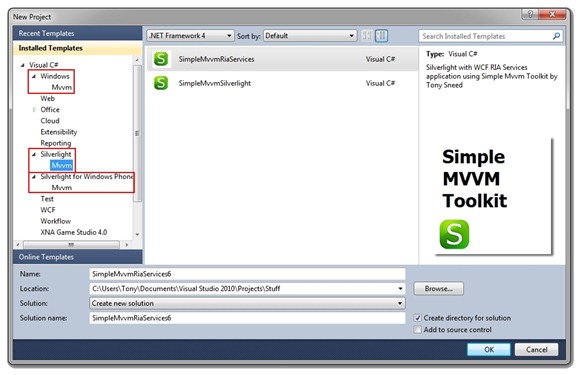
Earlier this year I authored an open-source toolkit, called Simple MVVM Toolkit, to help developers build Silverlight, WPF and Windows Phone applications based on the Model-View-ViewModel design pattern. To enhance developer productivity, the toolkit combines a set of helper classes with code and xml snippets, as well as Visual Studio item and project templates. After installing the toolkit, all a developer needs to do to get started is open Visual Studio and create a new project by selecting one the project templates that appear under the Mvvm category.

  smvvm-proj

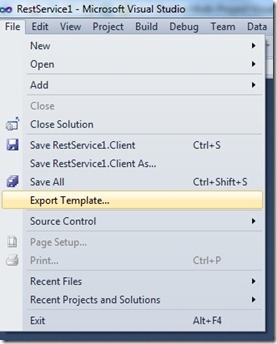
Visual Studio makes it extremely easy to create a single-project template. Simply select Export Template from the File menu and follow the prompts. This will produce a .zip file containing the contents of the project and a .vstemplate text file with xml describing the template content and properties.

exp-template

There are times, however, when it you would like to create a template which generates multiple projects belonging to a single Visual Studio solution. A good example is the SimpleMvmRiaServices project template shown in the first screenshot, which generates a Visual Studio solution with three projects: an ASP.NET Web project, a Silverlight client project, and a Test project for unit tests.  To create this template I first had to create individual templates for each of the three projects, then extract the contents of each zip file in order to combine them into a single multi-project Visual Studio template, with a .vstemplate file describing the contents.  Here is an example of a VSTemplate file I created for a Multi-Project WCF REST Template I recently did for a talk I gave at a .NET developer group (some of the content has been elided for clarity).

<VSTemplate Type="ProjectGroup">
  <TemplateData>
    <Name>WCF REST Service</Name>
    <Description>REST Service Template by Tony Sneed</Description>
    <ProjectType>CSharp</ProjectType>
    <TemplateGroupID>WCF</TemplateGroupID>
    <RequiredFrameworkVersion>4.0</RequiredFrameworkVersion>
  </TemplateData>
  <TemplateContent>
    <ProjectCollection>
      <ProjectTemplateLink ProjectName="$safeprojectname$.Client">
        Client\Client.vstemplate
      </ProjectTemplateLink>
      <ProjectTemplateLink ProjectName="$safeprojectname$.Entities">
        Entities\Entities.vstemplate
      </ProjectTemplateLink>
      <ProjectTemplateLink ProjectName="$safeprojectname$.Service">
        Service\Service.vstemplate
      </ProjectTemplateLink>
      <ProjectTemplateLink ProjectName="$safeprojectname$.Web">
        Web\Web.vstemplate
      </ProjectTemplateLink>
    </ProjectCollection>
  </TemplateContent>
  <WizardExtension>
    <Assembly>RestTemplateWizard, Version=1.0.0.0, Culture=neutral, PublicKeyToken=c9a76f51a8a9555f</Assembly>
    <FullClassName>RestTemplateWizard.RootWizard</FullClassName>
  </WizardExtension>
</VSTemplate>

The template encompasses four project templates: Client, Entities, Service and Web. Notice the variable, $safeprojectname$, which captures what the user entered for the project name in the New Project dialog. There is also a WizardExtension element, which references an IWizard implementation.  IWizard allows you to control the template creation process, for example, to allow projects to reference one another or to set project properties, such as the RIA Service project link required for my SimpleMvvmRiaServices template.

For my WCF REST template I wanted the Client and Service projects to both reference the Entities project, and for the Web project to reference the Service project. The problem here is that within each child template, $safeprojectname$ represents the current project name. There needs to be a way to pass in the root $safeprojectname$ from the parent template.  This is where the IWizard project comes in.

Start by creating a class library project and referencing the assembly, Microsoft.VisualStudio.TemplateWizardInterface.dll.  Create a RootWizard class that implements IWizard.  In the RunStarted method you can capture $safeprojectname$ from replacementParameters and store it in a public static Dictionary<string,string> so that it can be captured by a ChildWizard class and stored as $saferootprojectname$ in replacementParameters.

public class RootWizard : IWizard
{
    // Use to communicate $saferootprojectname$ to ChildWizard
    public static Dictionary<string, string> GlobalDictionary =
        new Dictionary<string,string>();

    // Add global replacement parameters
    public void RunStarted(object automationObject, 
        Dictionary<string, string> replacementsDictionary, 
        WizardRunKind runKind, object[] customParams)
    {
        // Place "$saferootprojectname$ in the global dictionary.
        // Copy from $safeprojectname$ passed in my root vstemplate
        GlobalDictionary["$saferootprojectname$"] = replacementsDictionary["$safeprojectname$"];
    }

    // Other members elided for clarity
}
public class ChildWizard : IWizard
{
    // Retrieve global replacement parameters
    public void RunStarted(object automationObject, 
        Dictionary<string, string> replacementsDictionary, 
        WizardRunKind runKind, object[] customParams)
    {
        // Add custom parameters.
        replacementsDictionary.Add("$saferootprojectname$",
            RootWizard.GlobalDictionary["$saferootprojectname$"]);
    }

    // Other members elided for clarity
}

You can now edit project references in child project csproj files, as well as using directives in source code files, to include $saferootprojectname$ where you want the user-entered project name to appear.

<Project ToolsVersion="4.0" DefaultTargets="Build">
  <ItemGroup>
    <ProjectReference Include="..\$saferootprojectname$.Entities
          \$saferootprojectname$.Entities.csproj">
      <Project>{3EC4AE2B-892C-42FC-9814-D46EB06A22E4}</Project>
      <Name>Entities</Name>
    </ProjectReference>
  </ItemGroup>
</Project>
using System;
using $saferootprojectname$.Entities;

namespace $safeprojectname$
{
    class Program
    {
        static void Main(string[] args)
        {
            // Client code goes here ...
        }
    }
}

Next, make sure to sign your wizard assembly, using a test certificate if you like, and then obtain the public key token by opening a Visual Studio command prompt at the location of your wizard dll and entering the command (replace WizardAssembly with your dll file name):
sn –T WizardAssembly.dll

sn-pubkey

Now that you’ve created a multi-project Visual Studio template, you need a way to deploy it.  The best way is to create a VSIX project, which allows you easily publish your template to the Visual Studio Extensions Gallery, so that developers from around the world can install it by selecting Extension Manager from the Tools menu right from within Visual Studio! First you’ll need to install the Visual Studio 2010 SP1 SDK (assuming you’ve first installed SP1 for VS 2010). Then create a new VSIX project (in the Extensibility category that now appears in the New Project dialog).  What you get is a nice designer for editing the .vsixmanifest file, where you can set properties and add content.

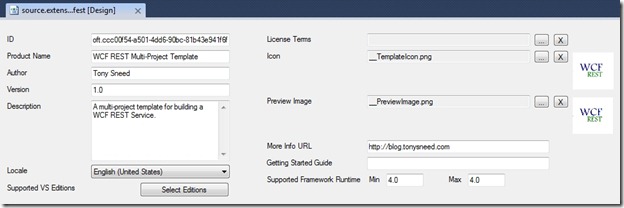
vsix-1

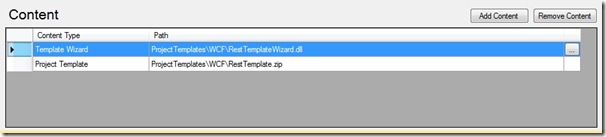
There are two items you will want to add as content. One is the template wizard assembly you just created, and the other is a zip file containing the multi-project template contents, including both the parent .vstemplate file and icons, as well as a folder for each child project template containing the project contents and .vstemplate file.

vsix-2

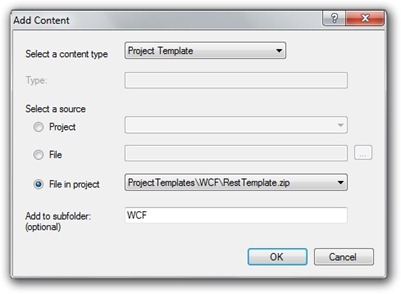
The important thing to note here is that the assembly for the IWizard implementation need not be installed into the Global Assembly Cache when it is packaged into the same VSIX project as the templates using it.  Another thing you might want to do when adding the template zip file is specify the category under which you want your template to appear in the Visual Studio New Project dialog.  In the the case of my WCF REST Template, I have indicated it should appear under the WCF category.

add-content

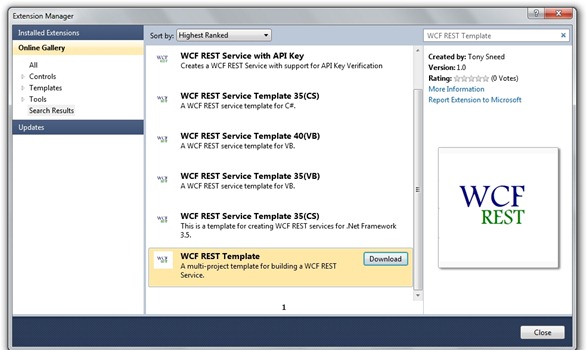
When you build the extensibility project, you’ll get a .vsix file that you can upload to the Visual Studio Extensions Gallery, so that it will appear in the Online Gallery when developers select Extension Manager from the Tools menu.  Enjoy.

ext-gallery

You can download the code for this article here.

Tony Sneed
http://blog.tonysneed.com

Posted in Technical | Tagged , | 69 Comments

Digging into WCF REST

Update: The recording for this talk is now available.

Last Thursday evening I presented a talk to the Dallas .NET User Group on support in WCF 4 for building REST-ful services. Here is a summary of the talk:

To REST or Not To REST? – Building REST-ful Services with the WCF Web Programming Model
REST is defined as an architectural style for building services that embrace the principles of the web. But what’s it good for? Tony will provide concrete examples of where it makes sense to implement REST-ful web services. He’ll also get down and dirty using the WCF Web Programming Model and show how WCF makes it easy to serve up POX or JSON, increasing the reach of your services to clients that don’t understand or care about SOAP. We’ll also look at API’s for syndicating content using RSS and ATOM.

Here are the slides and code for the talk, which highlighted improvements in WCF’s support for REST that arrived with .NET 4.0 and Visual Studio 2010, folding in features we first saw in the REST Starter Kit, which is now largely obsolete.

Here are some essential resources on WCF REST:

One of the things I highlighted in the talk is a Visual Studio template, which you can download from the Visual Studio Extensions Gallery, that creates a WCF REST-based service.  However, after installing the template, I was somewhat disappointed.  It creates a Visual Studio solution with just a single web project.  The service contract is merged with the implementation (just a class with no separate interface), and there is no client project.

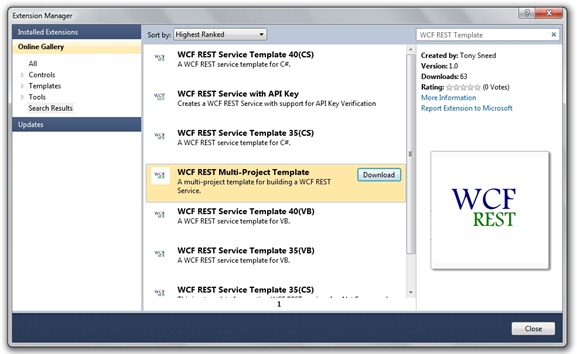
About an hour before the talk, I decided to create my own version of the WCF REST Template, which creates a multi-project solution containing a web project with the service interface and class placed in a separate class library project and the entities in their own class library project.  I also threw in a console client project which consumes the WCF REST service and uses LINQ to XML to parse the results.  I was so pleased with the template, that I packaged it into a vsix project and uploaded it to the Visual Studio Extensions Gallery, so all you have to do is open up Visual Studio, go to Tools, Extension Manager, select Online Gallery and search for WCF REST Template.

ext-gallery

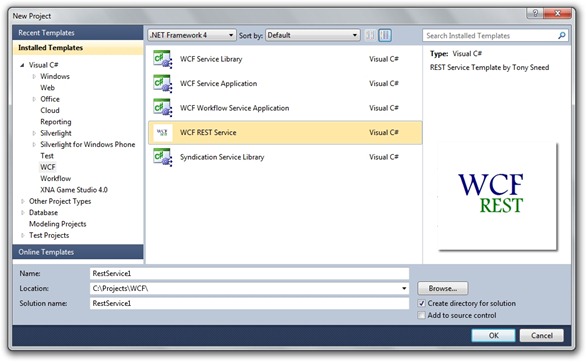
After installing the template, simply create a new project in Visual Studio, select the WCF category, and choose “WCF REST Service” from the list of project templates.

new-project

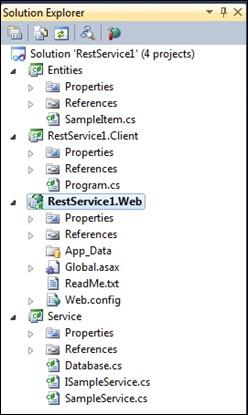
This will give you a solution containing four projects: An Entities project, containing a SampleItem class, a Service project, with an ISampleService interface implemented by a SampleService class, a Web project to host the service (which has a ReadMe file) and a Client project to consume the service.

sol-ex

All you have to do is set the Web project as the startup project for the solution and press Ctrl+F5 to launch the VS dev web server. Then set the Client project as the startup project and run it by pressing Ctrl+F5.  The client will issue an HTTP GET request to the service to retrieve XML representing a list of sample items. It uses LINQ to XML to parse the result into a list of items.

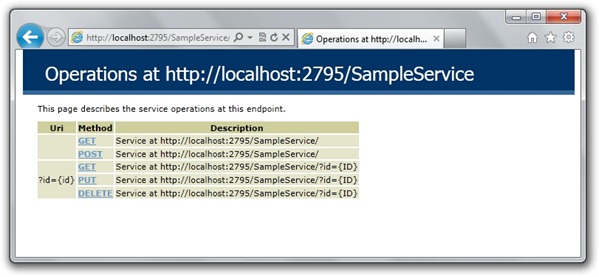
One of the things featured by the template is WCF 4’s simplified configuration model.  If you take a look at web.config, you’ll see that a default web http endpoint is configured to support a help page as well as automatic format selection (XML or JSON) based on the Content-Type and/or Accept HTTP headers.

rest-help

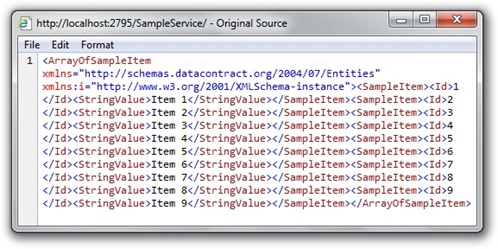
Typing the sample URI into the address of your browser will result in the following output:

get-collection

In addition, the template illustrates support in WCF 4 for using the ASP.NET url routing engine, in lieu of an .svc file.  You can see this in action if you take a peek at the code-behind for the global.asax file.

public class Global : HttpApplication {
    void Application_Start(object sender, EventArgs e)
    {
        RegisterRoutes();
    }

    private void RegisterRoutes()
    {
        // Edit the base address replacing the "SampleService" string below RouteTable.Routes.Add(new ServiceRoute("SampleService",
            new WebServiceHostFactory(), typeof(SampleService)));
    }
}

When an HTTP request arrives with a base address of SampleService (which you can change), the WebServiceHostFactory spins up the SampleService and maps the request to an operation, depending on the remaining part of the uri and the HTTP verb used.

// Start the service and browse to <a href="http://:/SampleService/help[ServiceContract]public">http://<machine_name>:<port>/SampleService/help [ServiceContract]
public interface ISampleService {
    [WebGet(UriTemplate = "")]
    List<SampleItem> GetCollection();

    [WebInvoke(UriTemplate = "", Method = "POST")]
    SampleItem Create(SampleItem instance);

    [WebGet(UriTemplate = "?id={id}")]
    SampleItem Get(int id);

    [WebInvoke(UriTemplate = "?id={id}", Method = "PUT")]
    SampleItem Update(int id, SampleItem instance);

    [WebInvoke(UriTemplate = "?id={id}", Method = "DELETE")]
    void Delete(int id);
}

This pattern also illustrates the resource-centric nature of a REST-based services architecture that leverages HTTP verbs for CRUD operations.  This architectural style comes in handy when you want to increase the reach of your service to clients that may not understand or care about SOAP, such as AJAX or Silverlight, or when you want to simplify the contractual footprint of your service by leveraging the uniform interface of the web and taking advantage of the HTTP protocol for things like security and caching.

I hope my WCF REST Template helps you get a better handle on building REST services with WCF. Enjoy.

Posted in Technical | Tagged | 20 Comments

Commands versus Event Triggers in MVVM

Recently I’ve received some questions from the Simple MVVM Toolkit’s discussion forum on when to use commands versus Blend-style event triggers. For several reasons I tend to favor event triggers over commands in most scenarios, especially for Silverlight applications.

Download the code for this blog post here.

  1. One of the main benefits of commands lies in the CanExecute property of ICommand, so that you can enable and disable a control based on a condition.  ICommand exposes a CanExecuteChanged event which when fired causes a binding to check the CanExecute property.  Unfortunately Silverlight requires you to fire the CanExecuteChanged event manually, which is why implementations of ICommand (such as the DelegateCommand in Simple MVVM Toolkit) also expose a public RaiseCanExecute method.
    • You can easily achieve the same result as CanExecute simply by binding the IsEnabled property of a control to a boolean property on the ViewModel.  Then call NotifyPropertyChanged, passing the property name with a lambda expression, whenever you want the binding to check the value of the boolean property.
  2. Currently commands can only be used by controls that derive from ButtonBase, such as a Button or HyperLink Button.  And it can only be used to respond to the button’s Click event.  Other toolkits have an EventToCommand behavior that allows you to invoke a command from events other than Click and with controls other than buttons.  However, you can accomplish much the same thing with a Blend event trigger, without the need for all the extra code required in the ViewModel for a command.
    • You can use an event trigger from the Blend SDK with a CallMethodAction that allows you to invoke a parameterless method on the ViewModel from any event on any control.  The question then arises on how to invoke methods that have input parameters.  You can usually bypass this need because the method in the ViewModel has access to properties on the ViewModel that are bound to controls in the View.  For example, I could have a method called ShowCustomer.  Instead of adding a customer parameter to the method, I can simply reference a SelectedCustomer property on the ViewModel, which can be bound to the SelectedItem property of a combo box in the View.
  3. There is one scenario where I would want to use commands, which is to call a method in the ViewModel that accepts a parameter with a value that cannot be obtained from a property on the ViewModel.
    • A good example of this would be buttons on a calculator.  In this case you would want to pass in arbitrary values to an Add method, which is wired up to an AddCommand.  The CommandParameter property of the button is your friend here.  Simply specify a number corresponding to the relevant button.  The generic DelegateCommand in Simple MVVM Toolkit is implemented in a way that dynamically calls a Parse method on the generic type argument.

Here is what an event trigger would look like, wiring up the SelectionChanged event of a combo box to a ShowCustomer method on the ViewModel. Simple MVVM Toolkit comes with an XML snippet you can use to insert an event trigger / call method action.  To use it you need to open up a view by right-clicking on it in the Solution Explorer and choosing “Open With …” and selecting XML Editor.  Then you should make sure to add a end element for the combo box control (</ComboBox> instead of />).  Right-click in the empty content of the ComboBox element and select Insert Snippet from the context menu. Then open “My XML Snippets” and drill down until you find the “mvvmtrigger” snippet. Type “SelectionChanged” for the event name and “ShowCustomer” for the method name.

<ComboBox Height="23" ItemsSource="{Binding Customers}" SelectedItem="{Binding Path=SelectedCustomer, Mode=TwoWay}"
          HorizontalAlignment="Center" VerticalAlignment="Center" Width="120" Grid.ColumnSpan="2" DisplayMemberPath="CustomerName">
  <!-- Add reference to Microsoft.Expression.Interactions.dll, System.Windows.Interactivity.dll -->
  <!-- Use mvvmxmlns snippet to add i and ei namespace prefixes -->
  <i:Interaction.Triggers>
    <i:EventTrigger EventName="SelectionChanged">
      <ei:CallMethodAction
              TargetObject="{Binding}"
              MethodName="ShowCustomer"/>
    </i:EventTrigger>
  </i:Interaction.Triggers>
</ComboBox>

The ShowCustomer method in the ViewModel looks like this.

public void ShowCustomer()
{
    if (SelectedCustomer != null)
    {
        MessageBox.Show(SelectedCustomer.CustomerName);
    }
}

Let’s take this example a bit further by adding a “Show Customer” button to the View that is only enabled when a customer has been selected.  We start by adding a CanShowCustomer boolean property to the ViewModel, so that we can bind the IsEnabled property of the button to it.

public bool CanShowCustomer
{
    get
    {
        return SelectedCustomer != null && SelectedCustomer.CustomerId > 0;
    }
}

Using the mvvmtrigger XML snippet we can add a trigger for the Click event that executes the ShowCustomer method on the ViewModel.  The button will be disabled when CanShowCustomer returns false.

<Button Content="Show Customer" Grid.Column="1" Height="23" Width="100"
        IsEnabled="{Binding CanShowCustomer}">
  <i:Interaction.Triggers>
    <i:EventTrigger EventName="Click">
      <ei:CallMethodAction
              TargetObject="{Binding}"
              MethodName="ShowCustomer"/>
    </i:EventTrigger>
  </i:Interaction.Triggers>
</Button>

The last thing we need to do is fire NotifyPropertyChanged for CanShowCustomer in the setter for the  SelectedCustomer property.

private Customer selectedCustomer;
public Customer SelectedCustomer
{
    get { return selectedCustomer; }
    set
    {
        selectedCustomer = value;
        NotifyPropertyChanged(m => m.SelectedCustomer);

        // Update bindings for CanShowCustomer
        NotifyPropertyChanged(m => m.CanShowCustomer);
    }
}

These examples illustrate how to wire up View events to ViewModel methods without using commands or the need for an EventToCommand behavior.  It works with all events on all controls and can be used to call parameterless methods on the ViewModel. I would only use commands in the case where you want to add a parameter to the ViewModel method with a hard-coded value passed in from the View via a CommandParameter.  For an example of this approach, take a look at my blog post on ViewModel-driven navigation, where I pass in the name of a page to a Navigate method on the ViewModel.

Enjoy,
Tony

Posted in Technical | Tagged , | 11 Comments

Validation with Simple MVVM Toolkit

In version 2.1 of Simple MVVM Toolkit I added support for validation with INotifyDataErrorInfo. This interface obsolesces IDataErrorInfo because it does everything that interface did but enables additional functionality:

  • Multiple validation errors per property
  • Entity-level validation
  • Asynchronous server-side validation

INotifyDataErrorInfo is supported by Silverlight 4, but it is not supported by WPF and will only have limited support in Windows Phone 7.1. The interface is defined as follows:

public interface INotifyDataErrorInfo
{
    bool HasErrors { get; }
    event EventHandler<DataErrorsChangedEventArgs> ErrorsChanged;
    IEnumerable GetErrors(string propertyName);
}

I believe the best place to implement this interface is at the model-level.  In WCF RIA Services, for example, the Entity class, which is the base class for client-side entities, implements INotifyDataErrorInfo.  Similarly, the ModelBase class in the SimpleMvvmToolkit namespace, implements this interface, for scenarios in which you are not using WCF RIA Services.

In the ViewModelDetailBase class, which accepts a TModel type argument, supports validation with an IsValid property.  It checks to see if the model implements INotifyDataErrorInfo and, if so, returns true if the HasErrors property is true.  When a PropertyChanged event fires on the model, ViewModelDetailBase calls NotifyPropertyChanged for the IsValid property.  You might, for example, bind the IsEnabled property of a Save button to the IsValid property of the ViewModel.  When properties are changed on the Model, the Save button would be disabled if there were any validation errors.

Performing validation with INotifyDataErrorInfo is very powerful.  It integrates well with DataAnnotations, so that you can apply attributes to class properties to enforce validation.  By default, the Binding markup extension supports INotifyDataErrorInfo and will transition to a validation visual state when the ErrorsChanged event fires.  Here is an example of requiring a non-blank value with a maximum string length of 50 characters for the Name property of the Item entity

class Item
{
    [Required()]
    [StringLength(50)]
    public string Name
    {
        get
        {
            return this._name;
        }
        set
        {
            if ((this._name != value))
            {
                this.ValidateProperty("Name", value);
                this._name = value;
                this.RaiseDataMemberChanged("Name");
            }
        }
    }
}

While you could write this code yourself, deriving the Item entity from ModelBase, there’s no need if you are using WCF RIA Services, which automatically inserts the [Required] and [StringLength] attributes based on the database column attributes. The ValidateProperty method calls Validator.TryValidateProperty under the covers, which uses reflection to inspect the data annotation attributes and populate the errors collection for that property. (For more information on entity-level and async validation, see my webinar on WCF RIA Services.)  When there are one or more validation errors, you’ll see a red outline around the offending textbox with a label showing the error message.

item_validation

Notice that the OK button is disabled while there are validation errors.  That is accomplished simply by binding IsEnabled on the button to IsValid on the ViewModel.

<Button Content="OK" Click="OKButton_Click"  
    IsEnabled="{Binding Path=IsValid, Mode=TwoWay}"/>

This example uses a handler in the View code-behind, but more likely you would use either an event trigger (with the Blend SDK installed) or a command with a CanExecute method. (I’ll elaborate on triggers versus commands, and when to use each, in a future post.)

While we’re on the topic of validation, it seems appropriate to discuss another feature added to version 2.1 of the toolkit, which is dirty-checking.  ViewModelDetailBase now sports an IsDirty property.  IsDirty calls an extension method called AreSame, which compares an entity with the clone that is created when BeginEdit is called.  This method simply or’s together the hash codes of each property on the objects and compares them.  Complex objects can override GetHashCode to implement custom comparisons.

One thing I’d like to mention that that, when it comes to validation and dirty-checking, there are certain properties you might want to exclude.  For example, entities in RIA Services have all kinds of properties that you would want to exclude from dirty-checking (EntityState, EntityConflict, EntityActions, etc). ViewModelDetailBase therefore has ModelMetadataProperties property with a list of property names excluded from both validation and dirty-checking.  It is defined as virtual so you can replace it if you wish.

To see validation in action, simply download and install the Simple MVVM Toolkit, then open up the SimpleMvvm-RiaValidation sample application and look at the ItemListViewModel class.

Posted in Technical | Tagged | 20 Comments

Simple MVVM Toolkit 2.1 Released!

There has been some good feedback on the project discussion board for Simple MVVM Toolkit. So I’ve incorporated most of the requested features and improvements and rolled them into an update.

Version 2.1 includes support for validation with INotifyDataErrorInfo for Silverlight apps, and ViewModels now perform dirty-checking. The toolkit has been marked as CLS-compliant so that VB.NET programmers can use it. I’ve made the MessageBus class public so that non-ViewModel classes can use it. And I’ve added navigation support for Windows Phone apps.

There are also new samples demonstrating validation with RIA Services and Windows Phone navigation support.

Download the new version of the toolkit here:
http://simplemvvmtoolkit.codeplex.com/releases/view/69754

It is also available from within the Visual Studio Extensions Manager, which directs you to the gallery:
http://visualstudiogallery.msdn.microsoft.com/74b7d72b-360a-4b5d-a634-01bc970487a4

And on the NuGet open-source gallery:
http://nuget.org/List/Packages/SimpleMvvmToolkit.Silverlight
http://nuget.org/List/Packages/SimpleMvvmToolkit.WPF
http://nuget.org/List/Packages/SimpleMvvmToolkit.WP7

Enjoy!

Tony

Posted in Technical | Tagged | 12 Comments